 Nadia Mohamed
Internal Link Graph
An internal link graph maps how your pages link to one another through in-content links. LinkLens builds one for any site — so you can see the editorial reality: which pages are orphans (no inbound links), which are the de-facto hubs, and where your pillar → spoke structure is missing.
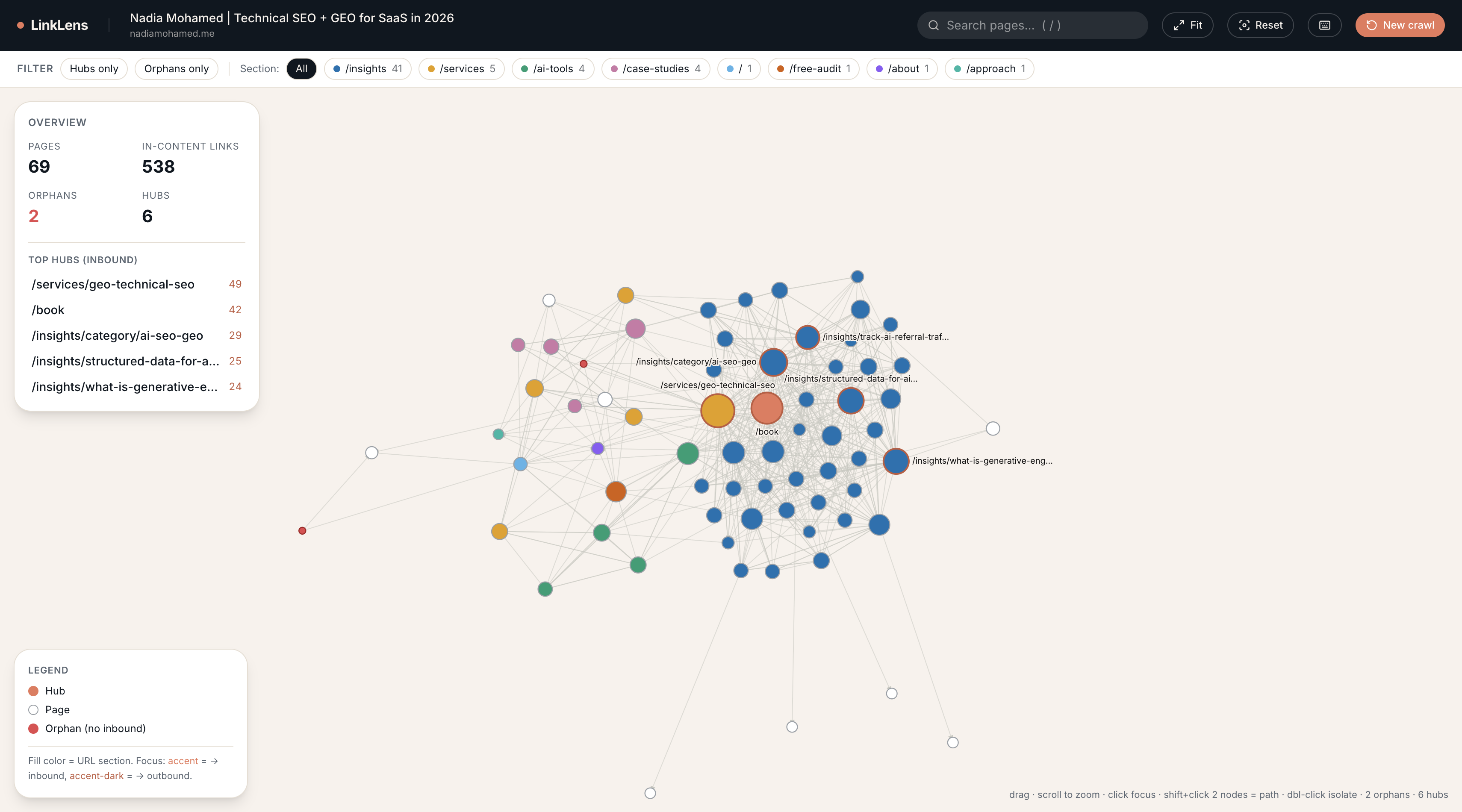
/assets/screenshots/internal-link-graph-ui.png LinkLens lives on its own subdomain. Enter a domain, and it discovers your pages via the sitemap, extracts only the links inside your content (not nav, header or footer), and renders the graph — auto-themed in your site’s own colours. Orphans surface in red; your biggest hubs sit at the centre. A sample of what it returns is below.
Open LinkLens ↗︎Opens in a new tab · Sign-up required
Sample output · this site, mapped
Top hubs by inbound links
- /services/geo-technical-seo49
- /book42
- /insights/category/ai-seo-geo29
- /insights/structured-data-for-ai-search25
- /insights/what-is-generative-engine-optimization24
How it maps your site
Four steps — and the whole product is in what it ignores.
Discover your real pages
LinkLens reads your
sitemap.xml(and sitemap indexes) to find every page, respectingrobots.txtas it goes. No sitemap? It falls back to a bounded crawl from the homepage.Extract only in-content links
This is the whole point. It keeps links inside your
<main>or<article>and strips everything in nav, header, footer, sidebars and breadcrumbs — because a link every page shares tells you nothing about editorial structure. That’s what a naive crawler gets wrong.Find orphans and hubs
It counts inbound and outbound links per page. Orphans have zero inbound in-content links — they can’t rank or receive authority. Hubs are your most-linked pages: the de-facto pillars, whether you planned them or not.
Render the graph
A force-directed graph, auto-themed in your site’s own brand colours. Drag nodes, zoom, search, and click any page to isolate its inbound and outbound links. Export the whole thing as a self-contained HTML file to hand to a client.
One honest caveat it surfaces for you: if a site is mostly JavaScript-rendered, in-content links can’t be read from the HTML — LinkLens flags this rather than showing a misleadingly empty graph.
Internal link graph FAQ
The questions people ask before they map a site.
What is an internal link graph?
An internal link graph is a visual map of how a website's pages link to one another through in-content links — the links inside the body of your content, not the navigation. It reveals which pages are well-connected hubs, which are isolated orphans, and where topic clusters form.
What is an orphan page?
An orphan page is a page with zero inbound in-content links from other pages on the same site. Because internal links pass authority and help search engines and AI crawlers discover content, orphan pages struggle to rank and are often missed entirely — even when they sit in your sitemap.
Why does LinkLens only count in-content links?
Links in the nav, header, footer and sidebar appear on every page, so they say nothing about editorial structure. LinkLens strips them and keeps only links inside your <main> or <article>, so the graph reflects how your content actually connects — the signal search engines and AI engines weigh most heavily.
How does it decide what counts as a hub?
A hub is a page in the top tier of inbound in-content links — the top decile, with a minimum of three. These are your de-facto pillar pages, whether or not you planned them that way. On this site, /services/geo-technical-seo is the biggest hub with 49 inbound links.
Does it work on JavaScript-rendered sites?
Partly. LinkLens reads links from the server-rendered HTML. If a site renders its content and links client-side with JavaScript, extraction is incomplete — so LinkLens flags the site as likely JS-rendered rather than showing a misleadingly empty graph.
Is it free?
Yes — LinkLens is free to use. Enter a domain and map it; sign-up is required so your crawls can be saved to your history and re-opened later.
Want the fixes, not just the map?
Finding the orphans is step one — rebuilding the internal link structure so authority flows to the pages that matter is the engagement. That’s the architecture half of a GEO & Technical SEO audit.