 Nadia Mohamed
Technical SEO
Disavow File in Google Search Console: When You Actually Need One (2026)
What is a disavow file in Google Search Console, and do you actually need one in 2026?
A disavow file is a plain-text document uploaded to Google Search Console that instructs Google to ignore specific backlinks when evaluating your site for ranking purposes. Google’s own documentation sets a deliberately high bar: it calls the tool “an advanced feature” that “should only be used with caution,” and states that “in most cases, Google can assess which links to trust without additional guidance, so most sites will not need to use this tool.” The documented test is two conditions that must both hold: a considerable number of spammy, artificial or low-quality links pointing at your site, and links that have caused a manual action or likely will. Outside that, the tool offers no benefit — and Google warns that used incorrectly it “can potentially harm your site’s performance in Google Search results.”
One thing to check before you read any further, because it disqualifies a large share of readers outright: the disavow tool does not support Domain properties. Google states it plainly — if your Search Console property is a Domain property, the disavow page does not apply to you. Since Domain properties are what most people now verify by default, this is the most common reason the tool is not where someone expects it to be.
TL;DR — Key takeaways
- Check your property type first. Google states that the disavow tool does not support Domain properties. If that is what you verified, this page does not apply to you and there is nothing to configure.
- Google’s official disavow documentation describes the tool as “an advanced feature” that “should only be used with caution” — that framing matters: it is not a routine SEO hygiene task, and using it without a specific trigger is more likely to hurt than help.
- Google publishes the threshold in writing, so you do not have to infer it. Disavow only if you have a considerable number of spammy, artificial or low-quality links, and those links have caused a manual action or likely will. Both conditions, not either.
- Google’s stated default is that most sites will not need the tool because it can assess which links to trust without guidance. Sites accumulate noisy backlink profiles in normal operation; that is not by itself a problem requiring intervention.
- The two scenarios where disavow is still load-bearing: a Webspam manual action explicitly citing unnatural inbound links, and a clearly documentable negative-SEO campaign where the pattern (anchor-text exact-match floods, identical PBN footprints, coordinated link drops) is obvious enough that Google would be expected to flag it.
- The file format is strict — plain text, UTF-8 or 7-bit ASCII, a
.txtfilename, one entry per line,domain:example.comfor entire domains or the full URL for individual pages, comments prefixed with#, a 2,048-character cap per URL, and a maximum of 100,000 lines and 2 MB. - Disavowing does not remove links from the Links report. Google says disavowed links continue to be shown there, so the report is not how you confirm the file worked.
- Disavow sits in Phase 2 (off-page foundations) of the broader 12-phase SEO & GEO audit framework, but only as a contingency tool. The primary off-page audit work is link-profile quality assessment, not disavowal.
When does disavow actually apply in 2026?
Two scenarios, narrowly defined.
Scenario 1 — Manual action for unnatural links.
Google’s Webspam team issues a manual action notification in Search Console when human reviewers determine a site has violated link-related guidelines (paid links, link schemes, PBN participation, large-scale guest-post networks with exact-match anchors). The notification appears under Manual Actions in Search Console with specific text indicating “Unnatural links to your site.” In this case, the disavow file is part of the remediation process: identify the offending links, attempt outreach for removal first, disavow the remainder, then file a reconsideration request. The disavow file is what tells Google “I cannot get these removed; please ignore them” — without it, the reconsideration request will fail.
Scenario 2 — Active negative-SEO campaign.
Negative SEO is rare and almost always overstated. A genuine campaign looks like: hundreds or thousands of clearly spammy links appearing in a short window, anchor text exactly matching commercial keywords the site doesn’t normally pursue, source domains with obvious PBN footprints or zero topical relevance, and timing correlating with an actual ranking decline that can’t be explained by other factors. This is unusual. Most “negative SEO attacks” turn out to be normal background-rate spam that the site owner only noticed because they started looking. Before reaching for disavow, document the pattern, verify it correlates with measurable ranking decline (Search Console clicks/impressions data for the affected pages), and rule out other causes (algorithm update timing, on-site changes, technical issues). If the pattern is genuine, disavow at the domain level for the offending sources.
Outside these two scenarios, the answer is no. A handful of low-quality directories that linked to your site in 2018? No. A scraper site that mirrors your blog content with footer links? No. Some Russian-language spam comments with no-follow links? No. A competitor site you suspect is linking with bad intent but can’t prove? Especially no — disavowing on suspicion has a worse expected-value than leaving the links alone.
Why the tool matters less than it used to
Google’s own position is the clearest evidence here, and it is written down rather than inferred from conference remarks: “in most cases, Google can assess which links to trust without additional guidance, so most sites will not need to use this tool.” That single sentence does the work. Google is saying its systems already discount links it does not trust, so telling it to ignore links it was ignoring anyway changes nothing.
Google reinforces this with the order of operations it recommends. Its first instruction is not to disavow at all — it is that “we recommend that you remove as many spammy or low-quality links from the web as possible”, and to reach for disavow only when you cannot get them removed. Disavow is the fallback for links outside your control, not the opening move.
Which gives you a usable test, taken from Google’s documented criteria rather than from anyone’s interpretation of them: have these links caused a manual action, or are they likely to? Google names that as one of the two conditions that must both hold before you disavow. If the honest answer is no, the second condition fails and you are done — regardless of how unpleasant the links look in a third-party tool.
The corollary is that “preventive” or “hygiene” disavow files are net-negative. Site owners who maintain quarterly disavow updates of every low-authority backlink in Search Console are systematically stripping ranking signals for no gain. Genuinely useless links contribute nothing, so disavowing them changes nothing; borderline-useful links contribute small positive signals, and disavowing them subtracts those. Google’s own warning is that incorrect use “can potentially harm your site’s performance in Google Search results” — the risk is asymmetric, and it runs against the person filing the file.
If you do need to file one, what’s the correct format?
The file format is documented in Google’s official disavow documentation. The non-negotiable requirements, each straight from that page:
- A text file encoded in UTF-8 or 7-bit ASCII, with a filename ending in
.txt. No .docx, no .pdf, no other format. - One URL or domain per line. Two entry formats are accepted:
domain:example.comto disavow an entire domain or subdomain, or the full URL to disavow a single page. - You cannot disavow a subpath. Google is explicit that an entry like
example.com/en/is not supported — it is either one page or the whole domain, with nothing in between. This is the format rule people most often get wrong on large multilingual sites. - Comments prefixed with
#are ignored by Google. They do not affect processing but make future audits possible — annotate every entry with why it’s there, when it was added, and what evidence supports the decision. Without comments, the file becomes unmaintainable within months. - Maximum URL length 2,048 characters; maximum 100,000 lines (blank lines and comments included) and 2 MB.
- No wildcards, no regex. The syntax is intentionally restrictive.
domain:*.example.comis not valid; onlydomain:example.com.
Two facts about what happens on upload that catch people out. First, the upload replaces rather than merges: Google says you can post one disavow list per property, and uploading a new list replaces the existing one. There is no append. Keep every version in source control, because the only copy of your previous list is the one you kept. Second, the list is scoped to the property you uploaded it to, plus its children. Google’s example is direct: a list on example.com also applies to m.example.com, and if you have separate http and https properties you need to upload a list for each. You also have to be a property owner to upload at all.
A correctly-formatted file looks like this:
# Disavow file for yoursite.com
# Last updated: 2026-06-03
# Reason: Manual action remediation, issued 2026-05-22, Webspam team cited "Unnatural links to your site"

# Section 1 — Confirmed paid-link scheme (sites selling guest posts with commercial anchor text)
# Removal outreach attempted 2026-05-25 through 2026-05-30; no responses
domain:paid-guest-posts-network.com
domain:seo-link-marketplace.net

# Section 2 — Obvious PBN footprint (identical templates, same hosting, no original content)
domain:pbn-cluster-1.com
domain:pbn-cluster-2.com
domain:pbn-cluster-3.com

# Section 3 — Specific compromised page on otherwise legitimate site
# Pharmaceutical spam injected into hacked Russian university subdomain
https://compromised-subdomain.university.ru/spam-page-with-our-link/
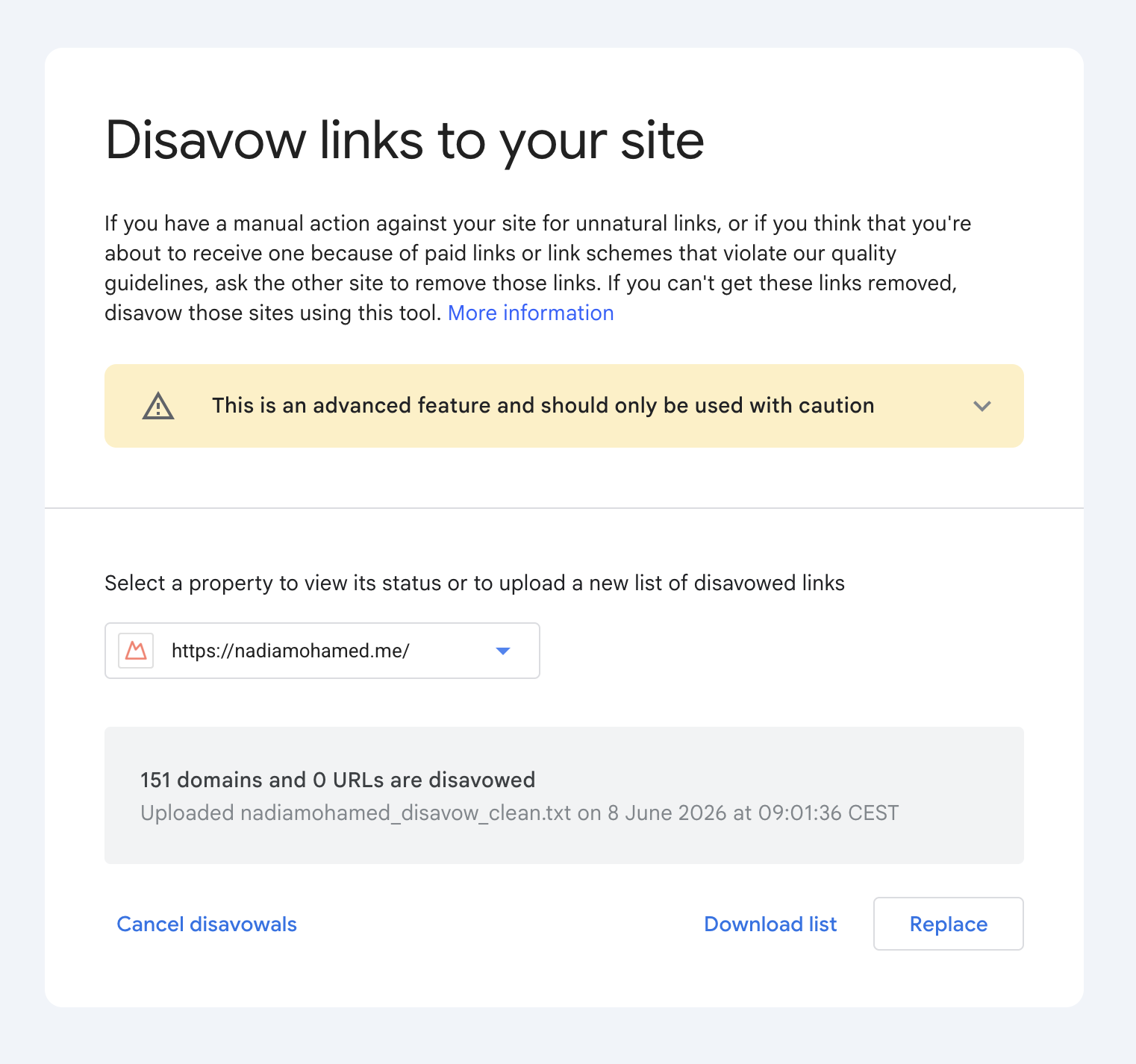
Upload through the disavow links tool page, select the verified property, choose the file, confirm submission. If the file has errors you see them immediately and your old list is not replaced — so a malformed upload fails loudly rather than silently, which is the opposite of what most guides claim. If it succeeds, Google says it can take a few weeks to be incorporated as it recrawls and reprocesses the pages involved.
Two expectations to set before you go looking for confirmation. Disavowed links keep appearing in the Links report — Google states this outright, so their continued presence there is not evidence the file failed. And if you ever need to undo the whole thing, the tool has a Cancel Disavowals control that removes the list for that property entirely; you do not need it to replace one list with another.
/assets/screenshots/gsc-disavow-upload.png What should you not do with the disavow tool?
Three failure modes that recur in audits:
Disavowing every low-authority link in your profile. Search Console’s Links report surfaces every link Google has discovered, including expired domain repurposes, scraper sites, and the long tail of low-authority blog comments and forum mentions that every site accumulates. Disavowing all of them is the most common over-correction. Most of those links contribute nothing to rankings either way, but some contribute small positive signals that get stripped by a blanket disavow.
Disavowing on competitor advice or vendor-marketed “toxic link” reports. Several backlink-monitoring vendors sell “toxic backlink” identification as a recurring service, complete with automated disavow file generation. The methodology is usually a heuristic score based on domain authority, anchor-text patterns, and topical relevance — none of which Google publicly endorses as disavow criteria. The vendor incentive is to maximise “toxic” flags (justifying ongoing fees); the SEO impact is usually neutral-to-negative. Treat any auto-generated “disavow recommendations” with the same scepticism you’d apply to any other automated SEO advice that you can’t independently verify.
Disavowing without first attempting removal. Google’s reconsideration request process explicitly asks for documentation of removal attempts before disavow. Skipping the outreach step weakens the reconsideration request and increases the time to manual action removal. For manual actions specifically, the order is: document offending links → attempt removal via direct outreach → wait 2-4 weeks for responses → disavow whatever remains → file reconsideration request with the outreach documentation attached. Reversing the order or skipping steps is a common reason reconsideration requests fail on first submission.
How do you measure whether the disavow worked?
For manual-action remediation, the primary signal is the manual action being lifted in Search Console — typically 2-4 weeks after a successful reconsideration request. The Search Console Manual Actions panel will show the status change from “Affected” to no listed actions; this is the unambiguous confirmation that the disavow + reconsideration cycle succeeded.
Ranking recovery follows separately. Sites that had rankings suppressed by a manual action typically see organic clicks and impressions stabilise within 4-8 weeks of the action being lifted, with full recovery sometimes taking 8-12 weeks as Google recrawls the site and reassesses the link profile. Tracking is straightforward: GSC clicks and impressions on the affected pages, week-over-week against the pre-action baseline.
For negative-SEO remediation (no manual action involved), the signal is more diffuse. The expectation is that ranking decline correlated with the spam-link influx stabilises and partially recovers as Google recrawls the disavowed source domains over 4-8 weeks. The harder analytical work is ruling out other causes of the original decline — algorithm updates, site changes, competitor activity — which may have been the actual driver rather than the spam links, and separating those signals is a standard part of technical SEO remediation work. Disavowing a negative-SEO campaign that wasn’t actually the cause produces no measurable recovery, which is itself diagnostic.
The broader audit pattern this work sits inside — link-profile assessment, recovery monitoring, manual action remediation — is part of the technical SEO audit framework, executed at standing-maintenance cadence rather than only when a problem appears.
FAQ
Do most sites actually need a disavow file?
No. Google’s documentation says so directly: “in most cases, Google can assess which links to trust without additional guidance, so most sites will not need to use this tool.” It also describes disavow as an advanced feature to be used with caution and sets two conditions that must both hold — a considerable number of spammy, artificial or low-quality links, and links that have caused or will likely cause a manual action. The two remaining practical cases are a manual action explicitly citing unnatural inbound links, and a documentable negative-SEO campaign correlated with measurable ranking decline.
Can disavowing accidentally hurt my rankings?
Yes, and Google says so: used incorrectly the tool “can potentially harm your site’s performance in Google Search results.” Disavowing legitimate links removes the ranking signal those links contribute. Site owners who maintain quarterly preventive disavow files of every low-authority backlink in Search Console are systematically stripping useful signals — the genuinely useless links contribute nothing either way, and the borderline-useful ones contribute small positive signals that get subtracted. The expected value of pre-emptive disavow is negative. Disavow only when there is a specific trigger, and document evidence for each entry.
How do I correctly format a disavow file for Google Search Console?
Plain text, UTF-8 encoding, .txt extension, one entry per line. Two entry formats are accepted: domain:example.com to disavow an entire domain (recommended for clearly spam sources, covers all subdomains implicitly), or the full URL to disavow a single page (recommended for one-off problematic pages on otherwise legitimate sites). Comments prefixed with # do not affect processing but make the file maintainable — annotate every entry with the reason, the date added, and supporting evidence. Maximum 100,000 lines (blank lines and comments included), file size under 2 MB. No wildcards, no regex. Upload via Search Console → Disavow Links Tool; the new file replaces any previous file entirely.
How long does Google take to process the disavow file?
Google processes the file as URLs are recrawled, not on a scheduled basis. For most sites, the affected URLs are recrawled within 2-4 weeks; full ranking impact (whether positive in the case of legitimate disavow, or negative in the case of accidental over-disavowal) typically becomes visible within 4-8 weeks. For manual action remediation specifically, the disavow file alone is not sufficient — it must be paired with a reconsideration request that documents removal outreach attempts. The reconsideration review usually takes 2-4 weeks after submission, with the manual action lifted (or denied) in the Search Console Manual Actions panel.
Why can’t I find the disavow tool for my Search Console property?
Almost certainly because you verified a Domain property. Google states that the disavow tool does not support Domain properties and that its documentation does not apply to them. Domain properties are now the default choice for most people verifying a site, which makes this the single most common reason the tool appears to be missing. If you genuinely need to disavow and only hold a Domain property, verify a URL-prefix property for the specific protocol and subdomain you need to cover, and upload the list there. Remember that a list uploaded to example.com also applies to child properties such as m.example.com, but http and https are separate properties needing separate lists.
Will disavowed links disappear from the Links report?
No, and this trips people up constantly. Google states that disavowed links will continue to be shown in the Links report. That report lists what Google has discovered, not what it is counting. Seeing your disavowed domains still listed a month later is expected behaviour and is not evidence that the upload failed. For manual-action remediation the confirmation you want is the action being lifted in the Manual Actions panel, not a change in the Links report.
What should I do instead of disavow for general low-quality backlinks?
Nothing, in most cases. Google’s stated position is that it can assess which links to trust without additional guidance, so manually disavowing links it already discounts changes nothing. The right posture for a normal backlink profile is to focus attention on the link-building side (earning legitimate editorial links through useful content, named-expert publishing, original data) rather than the link-pruning side. If a Search Console links report contains hundreds of unfamiliar low-authority sources, the correct response is usually to verify there is no manual action issued, confirm the ranking and traffic baseline are stable, and then move on. Time spent perfecting a defensive disavow file is time not spent on the citation-eligibility levers — schema, expert attribution, original data, freshness — that actually move organic and AI-citation outcomes.