 Nadia Mohamed
Technical SEO
Technical SEO Audits: 2026 Complete Methodology
What is a technical SEO audit?
A technical SEO audit is a structured examination of the infrastructure layer that determines whether search engines and AI engines can crawl, render, understand, and cite a site. It covers crawlability, indexation, Core Web Vitals, mobile usability, security, structured data, redirect handling, and — in the 2026 version of the discipline — the schema and entity signals that also drive AI citation eligibility. The fastest wins come from fixing robots.txt misconfigurations, eliminating redirect chains, deploying valid Article and FAQPage schema, and resolving Core Web Vitals failures on priority templates.
TL;DR — Key takeaways
- Technical SEO is the prerequisite layer for everything else. Schema on a page that cannot be crawled produces nothing; content quality on a page that fails Core Web Vitals competes from behind.
- The same infrastructure that helps Googlebot index efficiently also makes pages legible to the LLMs powering AI Overviews, ChatGPT search, and Perplexity. Clean technical SEO is now the foundation of GEO, not a parallel track.
- The four-phase audit order is fixed: crawlability and indexing first, then performance and rendering, then schema and entity signals, then ongoing error handling and monitoring. Issues earlier in the chain block the value of fixes later in the chain.
- Ahrefs’ AI Overview citation research found 38% of Google AI Overview citations came from pages already ranking in Google’s top 10, where “top 10” means the first 10 SERP blocks rather than organic positions 1-10 — down from ~76% in July 2025, as Google shifted toward query fan-out and Ahrefs improved its citation detection. Technical SEO that improves Google rankings still inherits an AI Overview citation advantage.
- Valid schema markup helps AI systems parse and attribute content, removing ambiguity that can otherwise prevent citation. The schema layer of a technical audit is one of the highest-leverage GEO inputs available.
Search engines and AI engines in 2026 are dramatically better at understanding content than they were three years ago — which makes the technical layer more important, not less. When content quality is table stakes across every competitive niche, the sites that win are the ones with clean crawl paths, fast rendering, validated structured data, and consistent entity signals that both traditional ranking systems and AI citation algorithms can parse without friction.
Technical issues rarely arrive as sudden ranking drops. They accumulate quietly: a sitemap that goes stale after a site migration, a canonical tag misconfigured on a template that propagates across 300 pages, a JavaScript rendering pattern that hides primary content from first-pass crawl, a third-party script that quietly destroys Largest Contentful Paint on the highest-traffic landing page. Sites that generate large page sets from a single template — the pattern covered in auditing programmatic SEO pages at scale — are especially exposed, because one template-level defect replicates across every generated URL at once. By the time these surface in analytics, months of organic and AI citation opportunity are already lost. Catching them is the entire reason the technical audit exists as a discipline.
Technical SEO audit checklist
The full audit splits into four phases, each phase producing the prerequisites for the next. The checklist below is the rapid-reference overview; the detailed phases follow.
Crawlability and indexing — robots.txt reviewed for unintended blocks, noindex usage intentional, XML sitemap lists only canonical indexable URLs returning 200 status, orphan pages eliminated, Search Console Index Coverage report clean.
Site architecture — every priority page within three clicks of the homepage, internal linking distributes authority to conversion pages, no duplicate URL versions, clean descriptive URL slugs.
Performance and Core Web Vitals — Largest Contentful Paint under 2.5 seconds, Interaction to Next Paint under 200 milliseconds and Cumulative Layout Shift under 0.1, each assessed at the 75th percentile of page loads and segmented by mobile and desktop; render-blocking scripts eliminated, images compressed and sized correctly.
Mobile optimisation — full content parity on mobile, Search Console mobile usability report clean, no intrusive interstitials, structured data consistent across mobile and desktop templates.
Security — HTTPS sitewide with valid SSL, no mixed content warnings, monitoring for compromised pages, Content Security Policy headers configured (advanced).
Structured data and technical signals — Article, FAQPage, and BreadcrumbList schema validated, rel="canonical" present on all duplicate-risk pages, redirect chains collapsed to single 301s, 404s repaired with topically relevant redirects.
Phase 1 — Crawlability, indexing, and site architecture
Auditing crawlability and indexing
The first question of every technical audit is the same: can search engines and AI engines find this content at all? The common blockers are an overly restrictive robots.txt, noindex directives left on production pages after a staging migration, blocked JavaScript resources, and client-side rendered content that first-pass crawlers never execute. Google’s robots.txt documentation is the authoritative spec; Google’s JavaScript SEO basics covers the rendering pipeline.
The audit starts in Google Search Console’s Index Coverage report to identify excluded and errored URLs. Each excluded URL is categorised: excluded by robots.txt, excluded by noindex, crawled but not indexed, discovered but not crawled, soft 404, or redirect error. Each category has a different fix, and the report tells the reviewer exactly which URLs sit in which bucket — which makes triage tractable even on large sites.
The XML sitemap is cross-referenced against the canonical URL set: every URL listed in the sitemap should be canonical, indexable, and returning a 200 status. Outdated URLs, redirect URLs, and non-canonical variants in the sitemap waste crawl budget and signal poor site hygiene. The sitemap is not a dump of every URL the CMS produces — it is a curated declaration of which pages the site wants search engines and AI engines to prioritise.
What to look for in the XML sitemap
A sitemap audit is one of the fastest wins in any technical review. The recurring errors that surface across most audits are paginated URLs that should be excluded, pages returning 301 redirects rather than 200 responses, canonicalised pages where the sitemap lists the non-canonical version, and stale URLs from removed content that should have been pruned from the sitemap when the content was removed. Each of these dilutes the crawl signal for the URLs the site actually wants ranked and cited.
The fix is structural: the sitemap should be generated dynamically from the canonical URL set, automatically excluding non-canonical, noindexed, redirected, and deleted URLs. This converts sitemap hygiene from an ongoing manual review burden into a deployment-time property of the CMS.
Site architecture and internal link equity
Every priority page should be reachable within three clicks of the homepage. Deep architectures dilute internal link equity and make it harder for crawlers to discover and prioritise content. A flatter structure across high-value category and landing pages ensures PageRank — and the entity recognition signals that AI engines extract from internal linking patterns — flows efficiently to the URLs that matter most.
Internal link audits also surface orphan pages: pages that exist but receive no internal links from other parts of the site. Orphan pages are effectively invisible to crawlers that follow links rather than relying solely on sitemaps. The fix is mechanical: identify orphans through a Screaming Frog crawl, add internal links from contextually relevant existing pages, and confirm the orphan set converges toward zero across audit cycles. The internal linking system in Phase 9 of the 12-phase audit framework covers the cluster-architecture side of this in detail.
Phase 2 — Performance, Core Web Vitals, and mobile
Core Web Vitals thresholds
Google’s Core Web Vitals are confirmed as a page experience signal influencing rankings. The three metrics, with thresholds from Google’s web.dev documentation:
- Largest Contentful Paint (LCP) — under 2.5 seconds for good. Most commonly improved by optimising server response time, preloading the hero image, eliminating render-blocking CSS in
<head>, and right-sizing the LCP element’s resource. - Interaction to Next Paint (INP) — under 200 milliseconds for good. INP replaced FID in March 2024. Improved by reducing main-thread JavaScript execution and deferring non-critical scripts.
- Cumulative Layout Shift (CLS) — under 0.1 for good. Caused by images without explicit dimensions, late-loading ads or embeds, and web fonts that trigger repaints before the page is stable.
The data anchor for the LCP priority comes from the Chrome UX Report (CrUX), which surfaces real-user field data on Core Web Vitals across the public web. CrUX data consistently shows that a significant share of mobile pages globally still fail the LCP threshold — which makes LCP the highest-priority Core Web Vitals fix for most sites in 2026, ahead of INP and CLS for most engagements.
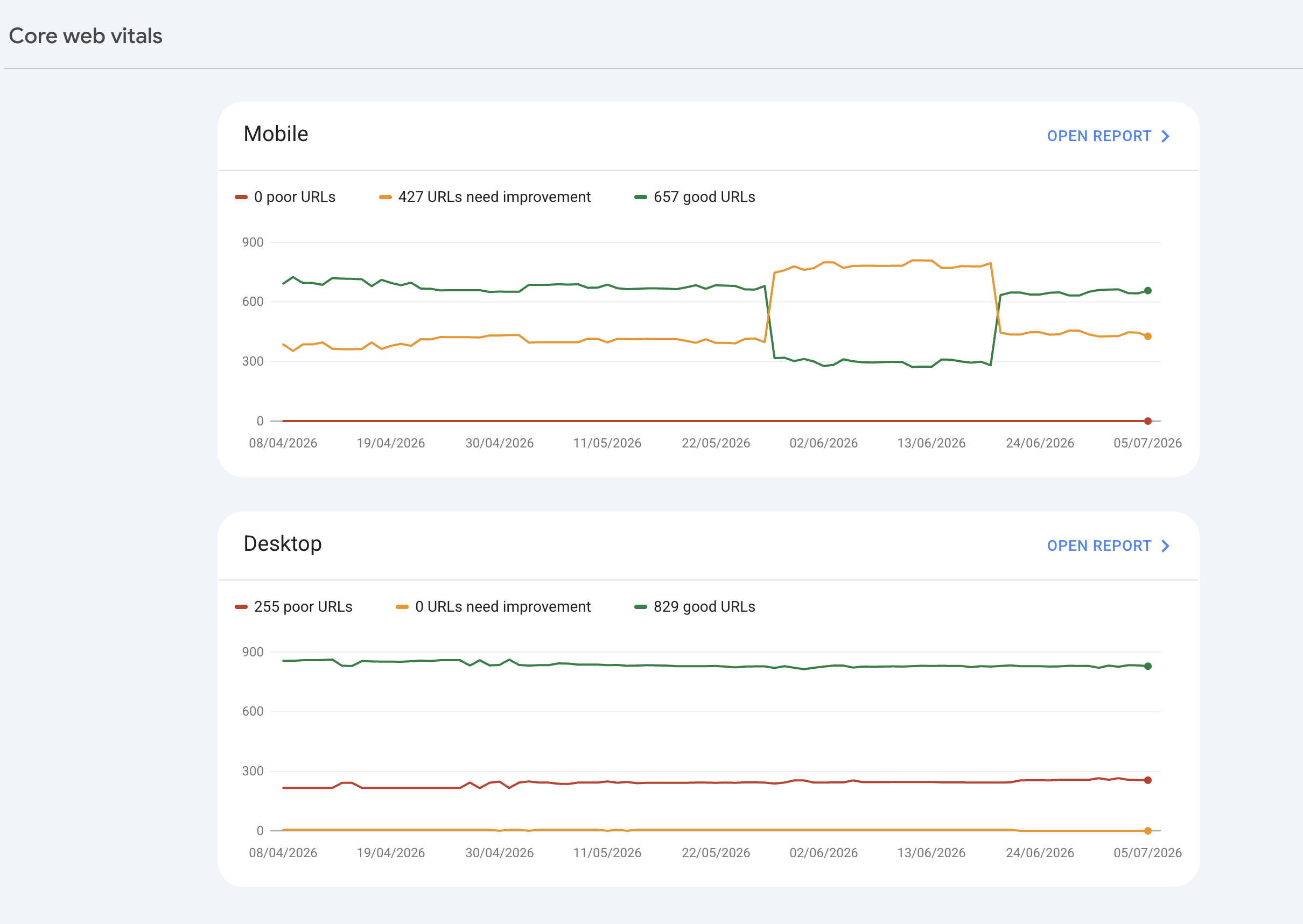
/assets/screenshots/core-web-vitals-report.png Mobile-first indexing
Google has completed the transition to mobile-first indexing, meaning the mobile version of a site is the primary version evaluated for ranking — regardless of whether the site has a separate mobile URL or uses responsive design. The mobile-first indexing documentation is the authoritative source.
The recurring mobile audit findings across most engagements: content hidden behind tabs or accordions only on mobile (which Google may not index as primary content), intrusive cookie or interstitial banners that trigger mobile usability penalties (the cookie banner guide covers what Google exempts and what it doesn’t), and structured data present on desktop templates but missing from the mobile equivalent template. According to StatCounter, mobile devices have held the majority of global web traffic since 2016, which makes mobile-first auditing the baseline rather than the optional layer.
JavaScript rendering and hidden content
One of the most under-diagnosed indexing failures comes from client-side JavaScript rendering primary content that Googlebot’s first-pass crawler does not execute. Google processes JavaScript in two waves: the initial HTML-only pass and the deferred rendering pass that can lag the initial crawl by days or weeks. Pages whose primary content, navigation, or internal links require JavaScript execution risk delayed indexing — or in cases of severe rendering failure, no indexing at all. Google’s JavaScript SEO basics documents the rendering pipeline.
The audit check is direct: use Google Search Console’s URL Inspection tool to fetch and render any page that relies heavily on JavaScript, and compare the rendered HTML to what a plain HTTP request returns. If significant content — headings, body text, internal links, schema markup — is missing from the pre-render version, the affected sections need to move to server-side rendering, static generation, or a hybrid pattern that ensures critical content is present in the initial HTML response.
Phase 3 — Structured data, schema, and on-page technical signals
Schema is now an AI visibility signal, not just an SEO signal
Schema markup has always helped search engines understand page content. In 2026, it also directly influences whether AI-powered search surfaces — Google AI Overviews, Bing Copilot, ChatGPT search, Perplexity — cite the source. Pages with clean Article, FAQPage, and BreadcrumbList schema are structurally readable by LLMs, which is precisely what makes them extractable as direct answers.
The schema layer is one of the highest-leverage inputs in a technical audit. Comprehensive structured data resolves the ambiguity that can keep a page from being cited, and cited content frequently quotes recognised, credentialed experts. Schema is no longer a rich-result optimisation; it is an entry condition for AI citation. The implementation detail lives in the schema markup foundation piece, which covers the full priority stack of schema types.
Which schema types to prioritise first
Not every schema type carries equal weight for visibility. For most content-driven sites the priority order is:
- Article / BlogPosting — signals content type and authorship to both traditional search and AI engines.
author,datePublished,dateModified, andheadlineare the minimum field set;authorshould reference the Person entity using@idrather than inline duplicating the Person fields. - FAQPage — the highest-citability schema type for AI search. Each question-and-answer pair is independently extractable by LLMs. Google’s FAQ rich result was deprecated on 7 May 2026, but the schema continues to drive AI citation eligibility independently of Google’s rich-result programme.
- BreadcrumbList — helps search engines and AI engines understand site hierarchy and improves the appearance of the result in the SERP. Straightforward to implement at the template level.
- Person / Organization — establishes entity identity for the brand and named authors. Increasingly important as AI engines evaluate source credibility by entity rather than purely by domain authority. The E-E-A-T entity signal piece covers the Person schema and
sameAsarray mechanics in detail.
Validation matters at least as much as initial implementation. Google’s Rich Results Test validates structured data and previews the rich result rendering (where one still exists). Validate on every new page template before launch and re-validate any time the template changes — silent schema regressions introduced by a template update are one of the most common findings on audits run after a site has been live for 12 months.
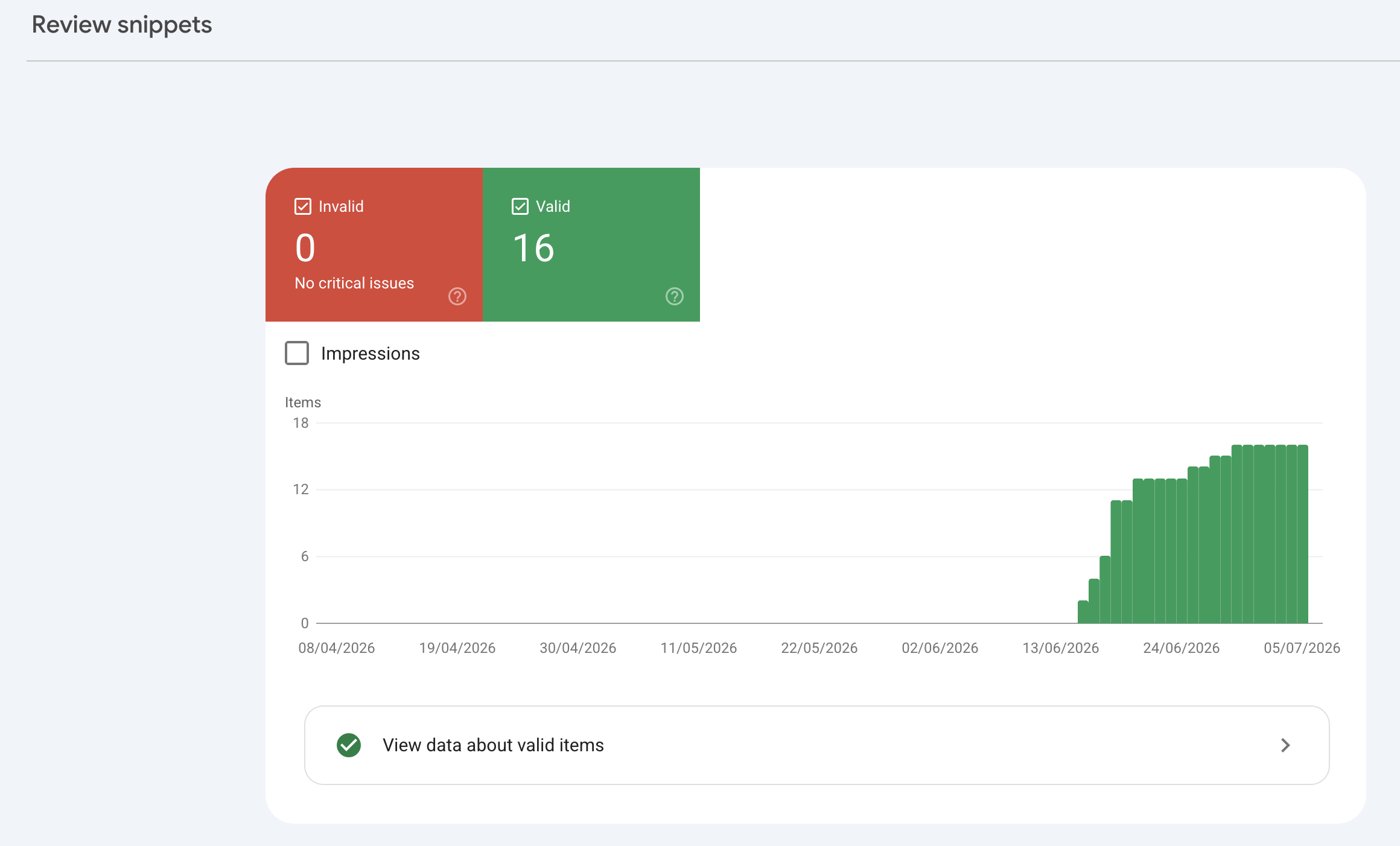
/assets/screenshots/rich-results-test.png Canonical tags and duplicate content
Duplicate content — from URL parameters, session IDs, faceted navigation, or staging environments accidentally left accessible to crawlers — dilutes ranking signals by splitting them across multiple URLs. The rel="canonical" tag tells search engines which version to count as authoritative. Google’s canonicalization documentation is the authoritative spec.
Two implementation pitfalls recur across audits: canonical tags pointing to a non-HTTPS URL (Google may not honour the canonical claim if the target URL is on a different protocol), and canonical tags inserted via client-side JavaScript rather than in the static <head> of the initial HTML response. Canonical tags belong in static HTML, always pointing to the HTTPS version of the preferred URL.
Phase 4 — Error handling, redirect chains, and ongoing monitoring
Fixing redirect chains and 404 errors
Redirect chains — where URL A redirects to URL B, which redirects to URL C — waste crawl budget and add latency to every page load in the chain. Each hop also reduces the equity passed to the final destination. The fix is to collapse chains into single 301 redirects pointing directly to the final canonical URL. Screaming Frog’s redirect chain report makes this tractable at scale.
For 404 errors, the correct priority order is: restore the content if it was removed by mistake, implement a 301 redirect to the most topically relevant live page if the content was intentionally removed, or allow it to return a true 404 if there is genuinely no relevant destination. The common mistake is routing all 404s to the homepage. Google’s fix guidance reserves the 301 for a page that has moved or has “a clear replacement”, and asks for a 404 or 410 when there is no replacement, so a homepage redirect can end up treated as a soft 404 instead of passing anything on.
Crawl data from the HTTP Archive Web Almanac consistently identifies redirect chains, broken internal links, and missing structured data as the most prevalent technical issues on large-scale sites. A monthly Screaming Frog crawl reviewed alongside Google Search Console’s Coverage report catches these before they accumulate into significant crawl debt.
What to include in a monthly SEO health check
A monthly health check does not need to be a full audit — it needs to be systematic enough to catch regressions before they compound. The minimum viable monitoring stack:
- Google Search Console (weekly): any new crawl errors, drops in indexed pages, manual actions, or security issues flagged.
- Google PageSpeed Insights (monthly): have Core Web Vitals scores regressed on the priority landing pages. Regressions often happen silently when new features or third-party scripts are added.
- Screaming Frog crawl (quarterly, or after any major site change): new redirect chains, new 404s, schema markup errors introduced by template updates.
The cadence matters more than the tool sophistication. The sites that sustain organic and AI citation performance are the ones with weekly Search Console review, monthly PageSpeed Insights spot-check, and quarterly Screaming Frog deep crawl built into the development sprint cycle. The instrumentation precedes the need, not the other way around.
Advanced technical SEO tools
Free tools — where every audit should start
For the full stack by job, with current prices, see the best technical SEO tools in 2026. These tools cost nothing and should be running continuously regardless of budget or team size:
- Google Search Console — the authoritative source for index coverage, Core Web Vitals field data, and crawl error reports, directly from Google. Non-negotiable for any site.
- Google PageSpeed Insights — provides both field data (real-user CWV from CrUX) and lab data (Lighthouse diagnostics) in a single report. Run it on the highest-traffic pages monthly.
- Google Rich Results Test — validates structured data implementation and previews how rich results render. Run on every new page template before launch and after any template change.
Paid tools — when to invest
Once a site has more than a few hundred pages, or once competitive context is needed alongside technical data, the paid tools earn their cost quickly:
- Screaming Frog SEO Spider — the standard for site-wide crawl analysis. Identifies broken links, redirect chains, duplicate content, missing meta tags, and schema errors in bulk. Free up to 500 URLs; the paid licence is worth the cost on any site with more than a few hundred pages. If a desktop licence per user does not fit your team, the Screaming Frog alternatives compared by job cover cloud, open-source and scriptable crawlers.
- Ahrefs — combines technical audit data with backlink analysis and keyword-level organic performance. Its Site Audit runs on a scheduled crawl and surfaces new issues as they appear, and its backlink profile view is where a reviewer first spots the toxic, spammy referring domains that may warrant disavowing toxic backlinks in Search Console.
- Semrush — comparable to Ahrefs for most audit use cases, with a stronger content marketing toolset alongside. Useful for tracking which structured data types competitors have implemented and which SERP features they are winning.
Choosing the right toolset
The right answer depends on site size and the type of information most needed. For a small business site under 500 pages, Google Search Console plus Screaming Frog’s free tier covers roughly 90% of what matters. For an e-commerce or editorial site with thousands of pages, a paid Screaming Frog licence combined with Ahrefs or Semrush provides the coverage and alert infrastructure needed to stay ahead of technical regressions. The operating principle is consistent across both ends of the size spectrum: instrument before the ranking drop, not after it.
The connection between technical SEO and AI search visibility
One of the most consequential shifts to plan for in 2026 is the growing overlap between traditional technical SEO and the citation algorithms of AI search. The technical signals that determine whether content is cited by ChatGPT, Perplexity, Google AI Overviews, and Copilot are largely the same signals that drive traditional SEO performance: clean crawlability, validated structured data, E-E-A-T signals in content and author markup, and a clear heading hierarchy that allows AI engines to extract modular answers from individual sections.
The empirical case for treating the two as one discipline rests on two cluster-verified data points, plus a structural principle that reinforces them:
- Previsible’s analysis of 6.77 million sessions across sites in SaaS, e-commerce, finance, legal, health, and publishing measured ChatGPT at 92.4% of LLM referral share, a denominator that excludes Google AI Overviews and AI Mode. Citation eligibility on ChatGPT is where the largest share of the addressable AI traffic concentrates, and ChatGPT’s retrieval pipeline rewards exactly the technical fundamentals a clean audit produces.
- Ahrefs’ AI Overview citation research measured 38% of Google AI Overview citations coming from pages already ranking in Google’s top 10 — down from ~76% in July 2025, as Google shifted toward query fan-out and Ahrefs improved its citation detection. Technical SEO that improves Google rankings still inherits an AI Overview citation advantage — the work is not duplicated across two channels.
- Machine-readable markup makes a page easier for AI engines to attribute confidently. The schema layer of a technical audit is one of the highest-leverage GEO inputs available, and it requires no separate workstream.
This convergence is operational good news for any site investing in technical SEO today. The infrastructure improvements that help Googlebot index content more efficiently also make pages more legible to the LLMs powering AI Overviews, Copilot, ChatGPT search, and Perplexity. A technically excellent site — validated schema, fast load times, well-structured content, clean entity signals — is already most of the way to AI-search-ready without a separate optimisation track. The gap between technical SEO and GEO is closing, and the 12-phase audit framework reflects that by placing the GEO layer directly inside the same engagement as the technical layer. The full distinction between the two disciplines is covered in the GEO definitional piece.
Prioritising the fix list
Every comprehensive technical audit produces more issues than can be addressed in a single sprint. The priority order that produces the largest performance lift per unit of engineering time is consistent across engagements: crawlability and indexing first, then rendering and performance, then structured data and entity signals, then the long tail of canonical and redirect cleanup. An issue that prevents Googlebot or an AI crawler from accessing a page at all outranks a schema error that merely reduces rich-result eligibility. An LCP failure affecting mobile users at scale outranks a suboptimal meta description on a low-traffic page.
A practical first-sprint priority list typically looks like: resolve any robots.txt or noindex errors blocking important pages, fix redirect chains on high-authority URLs, address the top LCP failure causing Core Web Vitals to fail at the domain level, implement or correct Article and FAQPage schema on the highest-traffic content, and validate Person schema with a populated sameAs array on the About page. Everything else — hreflang refinements, advanced Content Security Policy headers, URL parameter handling — moves to subsequent sprints once the foundational layer is solid. The step-by-step GEO audit checklist covers the same prioritisation logic applied to the AI citation layer specifically.
Your technical SEO action plan — start here
Set a quarterly calendar reminder to repeat these four steps and compare scores against the baseline. This cadence converts a one-off audit into a compounding technical advantage rather than a static deliverable.
- Run a Google Search Console coverage audit this week. Identify any pages excluded or errored that should be indexed, and flag any that are indexed but should not be.
- Crawl the site with Screaming Frog and export redirect chains, 404s, and duplicate title/meta tags for triage. Work through them in order of page authority and traffic.
- Test the top 5 landing pages in PageSpeed Insights on mobile. Note LCP and INP scores specifically and identify the single biggest bottleneck on each.
- Validate schema markup using Google’s Rich Results Test on the homepage, the most-linked article, and at least one core service or product page. Confirm Person schema with a populated
sameAsarray is in place on the About page.
For engagements that need this work designed and deployed end-to-end rather than executed internally, technical SEO and GEO consulting covers the crawl, schema, and entity layers as a single scope, and the 12-phase SEO & GEO audit framework places this technical layer as Phase 2 of a sequenced engagement that also covers entity signals, content architecture, GEO citation readiness, and tracking. The CareerFoundry case study documents the application of the framework to a long-running engagement.
The specifics diverge by site type: the SaaS SEO playbook covers the crawl-debt and rendering patterns unique to software marketing sites, headless-architecture technical SEO covers the rendering and crawl trade-offs of decoupled front ends, multilingual hreflang implementation covers international targeting, and the site migration guide covers the highest-risk moment for technical regressions.
The 2026 technical SEO audit checklist
Work through this in order. The grouping mirrors the four-phase methodology above — crawlability and indexing first, because a page an engine cannot reach cannot be rendered, understood, or cited no matter how good everything downstream is. Treat each box as a pass/fail check on your priority templates, not a one-off. This is the scannable version of the full technical SEO audit checklist for 2026; the reasoning behind each item lives in the phase sections above. For the expanded working list, with 47 checks in crawl, render, index and serve order and a pass condition for each, use the technical SEO audit checklist.
Crawlability and indexing
- robots.txt reviewed for unintended blocks — no important directory or JavaScript/CSS resource disallowed.
-
noindexdirectives present only where intended; none left on production pages after a staging migration. - XML sitemap lists only canonical, indexable URLs returning a 200 status — no redirects, non-canonical variants, or deleted URLs.
- Sitemap generated dynamically from the canonical URL set, so hygiene is a deployment-time property, not a manual chore.
- Search Console Index Coverage report triaged — every excluded/errored URL categorised and assigned a fix.
- Orphan pages eliminated — every priority page receives at least one internal link, confirmed via a Screaming Frog crawl.
- Every priority page reachable within three clicks of the homepage.
Rendering and Core Web Vitals
- Largest Contentful Paint under 2.5 seconds on mobile field data (CrUX), not just lab scores.
- Interaction to Next Paint under 200 milliseconds.
- Cumulative Layout Shift under 0.1 — images carry explicit dimensions, embeds and fonts reserve space.
- Render-blocking CSS and non-critical JavaScript deferred or eliminated in the
<head>. - Primary content, navigation, internal links, and schema present in the initial HTML — confirmed by comparing the URL Inspection rendered HTML against a plain HTTP request. Client-side-only content is the most under-diagnosed indexing failure.
- Full content parity between mobile and desktop templates (mobile-first indexing evaluates the mobile version).
Structured data
- Article / BlogPosting schema on every content page with
author,datePublished,dateModified, andheadline;authorreferences the Person entity by@id. - FAQPage schema retained where genuinely useful — still a valid Schema.org type driving AI citation eligibility, even though Google’s FAQ rich result was deprecated on 7 May 2026.
- BreadcrumbList schema at the template level.
- Person / Organization schema with a populated
sameAsarray on the About and author pages. - Article, Person, Organization, and BreadcrumbList validated in Google’s Rich Results Test on every new template and after any template change.
- FAQPage validated in the Schema.org validator instead — Google removed FAQ support from the Rich Results Test in June 2026, so it no longer validates FAQPage markup.
- Canonical tags present on all duplicate-risk pages, in the static
<head>, always pointing to the HTTPS version of the preferred URL.
Internationalisation
-
hreflangannotations return-link correctly (every language variant references every other, including a self-reference). -
hreflangvalues use valid ISO language and region codes, with anx-defaultset for the fallback page. - Each language variant is independently crawlable, indexable, and canonicalises to itself — not to a single master-language URL.
AI-crawler readiness
- Critical content served in the initial HTML for AI crawlers. GPTBot, ClaudeBot, and PerplexityBot fetch raw HTML and do not execute JavaScript — a client-rendered page can rank on Google yet be blank to them. Google-Extended is the exception: it inherits Googlebot’s Web Rendering Service and does render JavaScript.
- robots.txt reviewed for AI-crawler directives — GPTBot, ClaudeBot, PerplexityBot, and Google-Extended allowed (or intentionally blocked) as a deliberate policy decision, not by accident.
- Clean, sequential heading hierarchy so LLMs can extract modular answers from individual sections.
- Author and entity signals (Person schema,
sameAs) in place, since AI engines increasingly evaluate source credibility by entity rather than by domain authority alone.
The step-by-step GEO audit checklist applies this same pass/fail structure to the AI citation layer specifically, and the 12-phase SEO & GEO audit framework sequences the technical checklist alongside entity, content, and tracking work.
FAQ
What is a technical SEO audit?
A structured examination of website infrastructure—crawlability, indexability, Core Web Vitals, mobile usability, security, structured data, and redirect handling—determining how efficiently search engines and AI engines access, render, understand, and cite content.
How often should I conduct a technical SEO audit?
Quarterly full audits are standard, supplemented by weekly Search Console reviews and monthly PageSpeed Insights checks. Large sites benefit from monthly partial audits; smaller static sites can extend to semi-annual cycles.
What are the most common technical SEO issues?
Redirect chains, broken internal links, missing structured data, slow Largest Contentful Paint, JavaScript-rendered hidden content, incorrect canonical tags, stale sitemaps, and orphan pages without internal links.
Can a beginner perform a technical SEO audit?
Yes. Google Search Console, PageSpeed Insights, and Rich Results Test are free tools that surface high-impact issues without expertise, resolving roughly 60–70% of issues affecting small business rankings.
What is the difference between technical SEO and on-page SEO?
Technical SEO addresses infrastructure (crawlability, indexability, speed, security, structured data); on-page SEO addresses content (titles, headings, keywords, internal linking). Technical fixes precede content optimization.
What tools are essential for a technical SEO audit?
Essential free tools: Google Search Console, PageSpeed Insights, Rich Results Test. For deeper analysis: Screaming Frog SEO Spider (standard for crawl data); Ahrefs and Semrush add competitive context.
How long does it take to see results after fixing technical SEO issues?
Days to weeks for crawl/indexing fixes; weeks for redirect chains; 8–16 weeks for infrastructure overhauls. AI citation effects from schema typically follow 4–12 week propagation timelines.
How does technical SEO affect AI search visibility in 2026?
Technical SEO and AI visibility increasingly overlap. Clean crawlability, proper schema, and structured content drive both traditional rankings and AI citations. Ahrefs data shows “38% of AI Overview citations came from pages already ranking in Google’s top 10” (down from ~76% in July 2025, as Google shifted toward query fan-out and Ahrefs improved its citation detection) — counting SERP blocks, not organic positions 1-10.
What should a 2026 technical SEO audit checklist include?
A 2026 technical SEO audit checklist covers five groups. Crawlability and indexing: robots.txt with no unintended blocks, a clean XML sitemap of canonical 200-status URLs, a triaged Search Console coverage report, and zero orphan pages. Rendering and Core Web Vitals: LCP under 2.5s, INP under 200ms, CLS under 0.1, and primary content present in the initial HTML. Structured data: valid Article, Person, Organization, and BreadcrumbList schema validated in Google’s Rich Results Test, plus FAQPage validated in the Schema.org validator since Google removed FAQ from the Rich Results Test in June 2026. Internationalisation: correct return-linking hreflang with an x-default. And AI-crawler readiness: critical content in raw HTML, because GPTBot, ClaudeBot, and PerplexityBot do not execute JavaScript.