 Nadia Mohamed
Technical SEO
Site Migration Without Losing SEO Traffic: 2026 Guide
Can you migrate a website without losing SEO traffic?
A successful site migration requires a complete URL audit, a 1:1 redirect map, staging-environment testing, Search Console Change of Address activation, and at least 90 days of post-launch monitoring. Migrations that follow this sequence routinely maintain ranking continuity; migrations that skip the audit or rely on partial redirect mapping consistently lose organic visibility, and the recovery time after a botched migration is materially longer than the time the migration itself took.
TL;DR — Key takeaways
- Every migration is an SEO risk event. The pages currently ranking hold accumulated link equity, crawl history, schema markup, and engagement signals — move them carelessly and those signals get orphaned, rankings collapse, and recovery takes months.
- The non-negotiable pre-launch deliverables are a complete URL inventory of the live site, a 1:1 redirect map (one old URL to one thematically relevant new URL), staging-environment testing of every redirect rule, and a baseline snapshot of rankings, Core Web Vitals, and Search Console index coverage.
- Migrations that preserve technical SEO fundamentals also preserve AI citation eligibility. Ahrefs measured 38% of Google AI Overview citations coming from pages already ranking in Google’s top 10, counting SERP blocks rather than organic positions 1-10 and down from ~76% in July 2025, as Google shifted toward query fan-out and Ahrefs improved its citation detection. Preserving ranking continuity through a migration still inherits the AI Overview citation advantage.
- Schema preservation across migration is its own workstream. Articles, FAQ blocks, Person entity references, and Organization markup must survive the migration intact, or AI citation eligibility regresses independently of any Google ranking change.
- Migration sits as Phase 2 of the broader 12-phase SEO & GEO audit framework — the technical health layer, executed before content architecture, on-page optimisation, and GEO citation readiness.
What is a site migration in SEO terms?
A site migration is any structural change to a site that affects how search engines and AI engines crawl, index, or rank it. The category includes domain changes, URL restructuring, CMS switches, HTTP-to-HTTPS upgrades, internal architecture rewrites, and major redesigns that alter URL paths even when the domain stays the same.
From an SEO perspective, every migration is a risk event. The pages currently ranking hold accumulated link equity from external backlinks, internal link signal from cluster architecture, crawl history that informs Google’s prioritisation of which URLs to recrawl, engagement signals from years of user behaviour, and schema markup that determines AI citation eligibility. Move those URLs carelessly — without 1:1 redirects, without preserving canonical and hreflang declarations, without re-indexing signals to Google and Bing — and the signals are orphaned. Search engines and AI engines no longer know where the content went, rankings disappear, and organic and AI-referred traffic collapses simultaneously.
The recurring failure mode across migrations that lose traffic is rarely a single catastrophic mistake. It is an accumulation of small misconfigurations — a noindex tag left on a critical template, a canonical pointing to a non-HTTPS variant, a sitemap listing the old URL structure, a redirect chain that should have been a single hop — that compound into visible ranking decline 4–12 weeks after launch when the damage has already been done.
What should you do before a site migration?
Before touching a single file, build the baseline. This is the step most teams rush or skip entirely, and it is the step that determines whether the migration succeeds or fails.
Pre-migration audit checklist
-
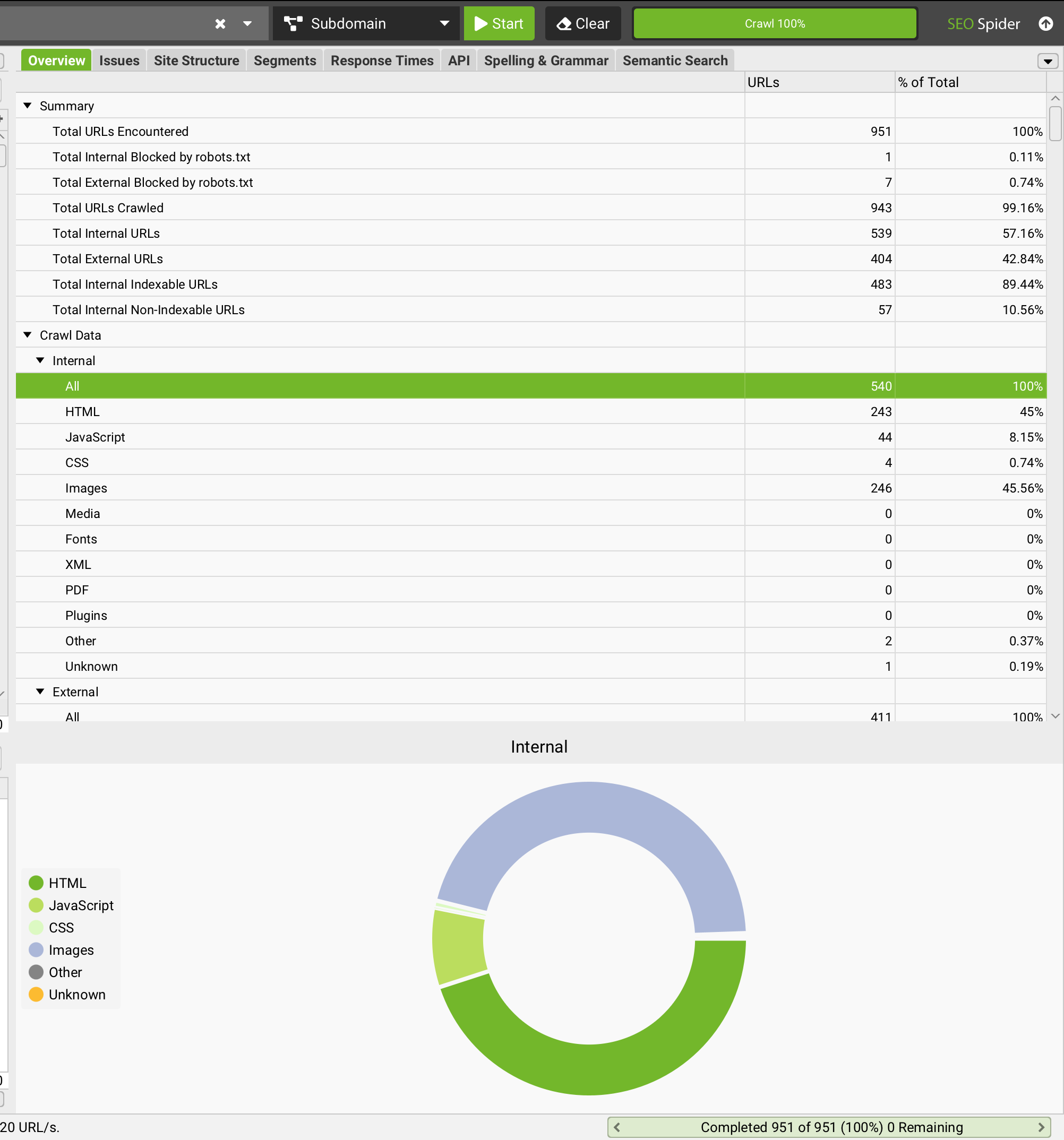
Full crawl of the live site. Extract every active URL, its HTTP status code, inbound internal links, and inbound external backlinks. Screaming Frog and Sitebulb both produce this in a single run for sites up to several hundred thousand URLs. The crawl output is the canonical list of URLs that need a redirect destination — any URL not on this list and not in the new URL structure is by definition a 404 candidate.
-
Ranking baseline. Record current keyword rankings for the top 50–100 pages by traffic and the top 50–100 pages by conversion. Use Google Search Console for the impression and click baseline and a rank tracker for the per-keyword position baseline. The baseline is what monitoring measures against post-launch.
-
Core Web Vitals snapshot per template type. Hero pages, category pages, article pages, product pages — measure each template independently because Core Web Vitals regressions usually hit one template across hundreds of pages rather than scattering uniformly across the site. PageSpeed Insights provides both lab and field data per URL; Chrome UX Report aggregates field data at the origin level.
-
Schema and structured data inventory. Article, FAQPage, BreadcrumbList, Person, Organization, LocalBusiness, Product — every schema block currently in production needs to be inventoried and migrated. The schema markup foundation piece covers the deployment pattern that scales; for migration purposes, the audit step is just confirming what currently exists so nothing gets silently dropped.
-
Canonical, hreflang, and robots.txt inventory. Document the current canonical pattern, every hreflang declaration if the site is multilingual, and the complete robots.txt as it exists in production. The migration must preserve or deliberately update each of these — silent changes to canonical or hreflang are among the most damaging migration failures because they are invisible in standard crawl outputs until the damage shows up in Search Console weeks later.
-
Backlink inventory. The top 100–500 referring domains, with the specific URLs they link to. External backlinks are what carry the largest share of accumulated link equity, and they are the URLs whose redirect destinations matter most. Reviewing the referring-domain list at this stage is also the natural moment to flag any toxic or spammy domains for disavowing toxic backlinks, so the new site does not inherit a compromised link profile.
The pre-migration audit is the same pattern documented in the broader technical SEO audit framework — applied at a specific migration scope rather than as a standing maintenance practice. Migrations that have produced real-world ranking continuity at scale, including the long-running engagement documented in the CareerFoundry case study and the multilingual industrial-instrumentation site documented in the SGM Lektra case study, share a common structural property: the audit phase ran to completion before any redirect rules or template changes were written.
How do 301 redirects work in a site migration?
A 301 redirect tells search engines that a URL has permanently moved to a new location. It passes the majority of link equity from the old URL to the new one, and it instructs crawlers to update their indexed reference from the old URL to the new one over subsequent crawl cycles.
The rule is 1:1 thematic mapping: one old URL redirects to one new, thematically relevant URL. The destination is the URL on the new site that covers the same content as the source URL covered on the old site — not a generic category page and never the homepage.
Never redirect every old page to the homepage. This is the single most destructive shortcut in migration history. A homepage redirect tells Google that /blog/how-to-use-crm and /services/accounting are now the same thing as the homepage, which they are not. Google’s fix guidance reserves the 301 for a page that has moved or has “a clear replacement”, and a homepage is neither, so a blanket homepage redirect can end up treated as a soft 404 instead of passing the old URLs’ signals on. The fix is mechanical: every URL on the old site needs a thematically relevant destination on the new site, and the URLs that genuinely have no relevant destination should return a clean 404 rather than redirect to nothing.
Common redirect errors to avoid
-
Redirect chains. Old URL → intermediate URL → new URL. Each hop dilutes crawl efficiency and adds latency. The fix is to collapse every chain so each old URL points directly to its final destination in a single hop. Screaming Frog’s redirect chain report makes this tractable at scale.
-
Redirect loops. URL A → URL B → URL A. Fatal — Googlebot stops the crawl when it detects a loop. Loops are usually template-level errors that affect hundreds of URLs simultaneously and are caught immediately by a staging crawl.
-
Redirecting to 404 destinations. If the destination URL does not exist yet in the new site, the redirect is worthless. The audit step that catches this is a staging crawl that follows every redirect to its destination and confirms the destination returns 200.
-
Redirecting from HTTPS to a non-HTTPS destination. Google’s canonicalisation guidance treats protocol mismatches as a weak canonical signal. Always redirect to the HTTPS version of the destination URL.
Before launch, test every redirect rule in the staging environment using Screaming Frog, Sitebulb, or an equivalent crawler. After launch, re-crawl within 24–48 hours to confirm every rule is live and clean and that no URL has slipped into a chain, loop, or 404.
/assets/screenshots/screaming-frog-crawl.png What crawlability and indexability checks must happen before launch?
Even with a perfect redirect map, a migration can lose ranking visibility through a single misconfigured robots.txt directive or a stray noindex tag. The pre-launch staging checks that prevent this:
Crawlability
- robots.txt does not block Googlebot, Bingbot, or relevant AI crawlers (OAI-SearchBot, PerplexityBot, ClaudeBot, Google-Extended) from the new URL structure.
- XML sitemap lists only canonical, indexable URLs returning 200 status — no redirected URLs, no non-canonical variants, no noindexed URLs.
- Internal links use the new URL structure throughout — no template still pointing to the old URL paths.
- JavaScript-rendered primary content is server-side rendered or statically generated so first-pass crawl sees the canonical content.
Indexability
- No accidental noindex meta tags on pages that should rank. Staging environments often have site-wide noindex during development; the launch checklist must confirm this is removed.
- Canonical tags point to the correct self-referencing URL on the new site, not legacy URLs from the old site.
- Hreflang attributes updated for multilingual sites; every language variant declares the others bidirectionally; sitemap declarations match the on-page declarations.
- Article, BreadcrumbList, and Person/Organization schema present on the new templates and validated via Google’s Rich Results Test before launch; FAQPage markup validated with the Schema.org validator, since Google removed FAQ support from the Rich Results Test in June 2026.
The pattern that produces durable migrations is staging-environment parity: the staging site mirrors the production configuration closely enough that the launch checks performed in staging predict launch behaviour. Sites that test in staging environments with different robots.txt, different schema deployment, or different rendering behaviour than production routinely launch with issues that staging would have caught if it had matched production.
How do you protect Core Web Vitals during a migration?
Core Web Vitals are a separate audit track from crawlability and one that teams routinely defer as a post-launch task. Deferring is a mistake — a migration that causes a Core Web Vitals regression triggers a page experience signal change independent of any redirect or indexability issue.
Before launch, measure against the pre-migration baseline at template level:
-
Largest Contentful Paint (LCP) — target under 2.5 seconds. Per Google’s web.dev documentation the largest contentful element is usually the hero image, hero heading, or above-fold visual; it must render within 2.5 seconds for the page to pass the LCP threshold.
-
Interaction to Next Paint (INP) — target under 200 milliseconds. INP replaced FID in March 2024 and measures responsiveness to user interaction across the page’s lifetime.
-
Cumulative Layout Shift (CLS) — target under 0.1. Caused by images without explicit dimensions, late-loading ads or embeds, and web fonts triggering repaints before content stabilises.
-
Time to First Byte (TTFB) — under 200ms for key landing pages. A new hosting environment, a new CMS, or a new CDN configuration can shift TTFB significantly.
-
Third-party script audit. New platforms often introduce heavier tag stacks than the old platform carried. Audit the third-party script set on the new templates and compare to the old; defer or remove scripts that do not justify their performance cost.
Treating Core Web Vitals optimisation as part of the migration scope rather than a follow-up workstream is what allows the performance improvements to compound from launch day forward. The migration pattern documented in the CareerFoundry case study applied this approach: templated schema, image compression pipelines, render-blocking script elimination, and lazy loading were all completed as part of the migration rather than deferred as follow-up tasks.
What happens on migration launch day?
Launch day is a transition point, not a finish line. The first 4–6 hours determine whether the migration recovers cleanly or accumulates damage that compounds over the next 90 days.
Immediate post-launch checklist
-
DNS propagation complete. Verify the new site is live globally, not just from the launch team’s region. Tools like DNS Checker show propagation status across global resolvers.
-
All 301 redirects returning correct status codes. Use a crawler (Screaming Frog, Sitebulb) rather than manual spot-checks. Crawl the old URL set and confirm every URL returns 301 with the expected destination URL and the destination returns 200.
-
Updated XML sitemap submitted to Search Console and Bing Webmaster Tools. Submission accelerates re-indexing of the new URL structure relative to organic discovery.
-
Change of Address tool used if migrating domains. Google Search Console’s Change of Address tool explicitly signals the move to Google and is the single highest-leverage post-launch action when the migration includes a domain change.
-
GA4 and Tag Manager firing correctly on the new site. Verify the data layer, the event firing, and the AI source channel group regex (if implemented per the GA4 AI tracking piece) all work on the new templates.
-
Redirect monitoring alerts active. Any new 404 should surface within hours, not days. Search Console’s Pages report shows new 404s on the next crawl; third-party monitoring tools (Ahrefs Site Audit, Semrush, Sitebulb scheduled crawls) surface them faster.
Do not switch off the old server immediately. Keep it live for at least 30 days to ensure redirect rules handle edge-case URLs the audit may have missed. After 30 days, the redirect logic can be migrated to a CDN-level rule set and the legacy server decommissioned.
How long does SEO recovery take after a migration?
A well-executed migration with clean redirects and proper Search Console signals typically stabilises within 4–12 weeks. Rankings may fluctuate in the first two weeks as Google re-crawls and re-evaluates the new site — this is normal and expected, and reacting to fluctuation in the first week usually amounts to adjusting variables before the engines have had time to process the changes.
A poorly executed migration can take 6–18 months to recover from, and some traffic loss is never recovered if link equity is permanently orphaned (URLs deleted without redirects, redirect chains that exceeded crawl tolerance, canonical confusion that persisted long enough for the engines to deindex the wrong variant).
The factor that most reliably predicts which side of the distribution a migration lands on is structured monitoring discipline across the 90 days post-launch:
-
Organic sessions week-over-week against the pre-migration baseline. Week 1 fluctuation is normal; week 4 still showing decline against baseline is a recoverable signal if caught early.
-
Keyword rankings for the top 50 pages. Page-level ranking drops surface before sitewide traffic drops because the engines re-evaluate individual URLs faster than they re-evaluate the domain as a whole.
-
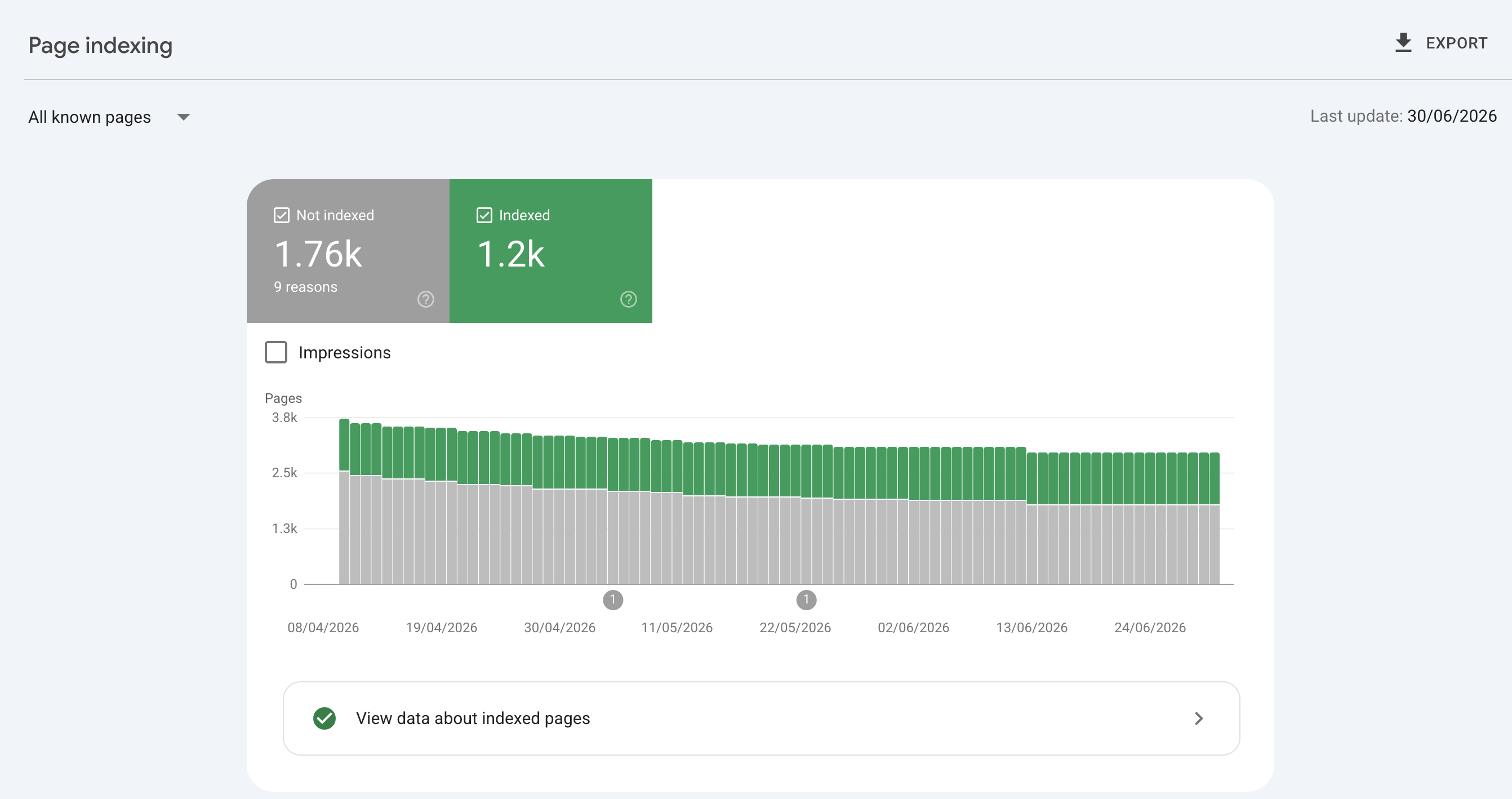
Search Console Index Coverage. Watch for spikes in “Excluded” and “Crawled but not indexed” categories — these are the leading indicators of canonical confusion or noindex misconfiguration.
/assets/screenshots/gsc-coverage-report.png -
404 errors in Search Console’s Pages report. Any 404 surfacing on a URL that has external backlinks is recoverable equity being orphaned; add a redirect immediately rather than waiting.
-
External backlink destinations. Confirm major referring domains are linking to live pages, not 404s. Ahrefs and Majestic both export referring-domain reports with destination URLs.
The cadence that catches recoverable problems before they compound is weekly reporting through the first three months and reacting to anomalies within 48 hours rather than at the next scheduled review.
Migration and AI citation eligibility
The technical fundamentals that preserve Google ranking through a migration also preserve AI citation eligibility — the two are now closely coupled rather than separate workstreams. The empirical anchor:
- Ahrefs’ AI Overview citation research measured 38% of Google AI Overview citations coming from pages already ranking in Google’s top 10, counting SERP blocks, not organic positions 1-10 — down from ~76% in July 2025, as Google shifted toward query fan-out and Ahrefs improved its citation detection. A migration that preserves Google ranking inherits the AI Overview citation advantage; a migration that loses Google ranking loses AI Overview citation visibility simultaneously.
- Recently updated content earns more AI citations. A migration that resets
dateModifiedacross the content set in a structured way (preserving the modification history for content that did not actually change, updating only what was deliberately refreshed) preserves the freshness signal. A migration that bulk-resetsdateModifiedon every URL signals a sitewide freshness reset that the AI engines may treat as suspicious rather than as genuine freshness.
Preserving these signals through a replatform is the core of a GEO and technical SEO migration engagement — the migration-specific GEO checks to add to the launch checklist:
- Schema markup audit on the new templates — every schema type that existed on the old site exists on the new site, validated via Rich Results Test.
- Person schema with
sameAsarray preserved on the About page (or the new equivalent URL with a 301 from the old About page). - Article schema
authorreferences the same Person@idas on the old site, so author entity signals migrate cleanly. - FAQPage schema preserved on all pages that carried it on the old site (FAQ rich result was deprecated 7 May 2026, but the schema still drives AI citation eligibility independently).
dateModifiedupdates only where content actually changed during migration; URLs that were genuinely just relocated keep their originaldateModified.
Most common site migration mistakes
The recurring failure patterns across migrations that lose traffic:
-
Not crawling the old site before migration. Teams discover missing redirects only after Google reports 404 errors. By then, rankings have already dropped and recovery is reactive rather than preventive.
-
Redirecting everything to the homepage. Destroys page-level ranking signals; a homepage is not “a clear replacement” for a specific old page, so the old URLs can end up treated as soft 404s.
-
Forgetting the Change of Address declaration in Search Console. Without it, Google discovers the domain move slowly and organically, delaying recovery by weeks compared to the explicit signal path.
-
Migrating content without improving it. A migration is the highest-leverage opportunity to prune thin pages, consolidate duplicate content, and refresh outdated articles. Moving low-quality content to a new URL does not fix it — it just relocates the problem with the new URL inheriting the old performance.
-
Ignoring local SEO. For sites with physical locations, Google Business Profile, Yelp, and directory listings need the new URL immediately. A disconnected local presence confuses users and search engines and produces measurable local pack ranking decline.
-
No post-launch monitoring plan. Migrations do not end at launch — the 90 days after are when most recoverable problems surface, but only if someone is watching with the right cadence and the right reaction time.
-
Schema markup silently dropped during template rewrites. The new templates omit Article, FAQPage, or Person schema that the old templates carried. Google ranking may recover; AI citation eligibility regresses independently and the cause is invisible until the prompt matrix surfaces it.
Should you migrate and redesign at the same time?
In most cases, no. Combining a URL migration with a full visual redesign introduces two major variables simultaneously, making it nearly impossible to diagnose the cause of any post-launch traffic change. A drop could be caused by the URL changes, the template changes, the content changes that accompanied the redesign, or any combination — and the debugging workload multiplies rather than adds.
If both are necessary in the same timeframe, treat them as sequential projects: migrate first, stabilise for 4–6 weeks, then redesign. The 4–6 week stabilisation window lets the engines re-evaluate the migration on its own merits before the redesign introduces additional variables. If timelines force the two into a single release, document every change with timestamps so post-launch debugging can isolate causes against the change log.
Frequently asked questions
How long should I keep 301 redirects live after a migration?
Permanently is the safest default; 12 months is the operational minimum. Removing redirects too early breaks external links that still point to old URLs and causes link equity loss that is no longer recoverable through any reactive action. The server overhead of maintaining redirect rules is minimal compared to the SEO cost of removing them. The operational pattern that scales is to migrate the redirect logic to a CDN-level rule set (Cloudflare, Fastly, CloudFront) after the first 30 days, where the rules can persist indefinitely without occupying application-server resources.
Will a site migration always cause a rankings drop?
No — a well-planned migration with clean redirects, correct Search Console signals, schema preservation, and Core Web Vitals continuity routinely maintains rankings through launch and can improve them when the migration includes content quality and technical fixes. A temporary 5–10% fluctuation in the first 2–4 weeks is common even in successful migrations and should not trigger panic; reacting to week-one fluctuation by changing variables usually amounts to adjusting before the engines have processed the original changes. Sustained decline against the baseline by week 4 is the threshold that calls for diagnostic action.
What is the difference between a site migration and a redesign?
A redesign changes visual design and UX without changing URLs, domain, or underlying technical infrastructure. A site migration changes the technical structure — URLs, domain, CMS, protocol, or site architecture. Redesigns carry lower SEO risk because the underlying signals (link equity, crawl history, canonical URLs, schema markup) remain attached to the same URLs. Migrations require the full pre-launch audit and post-launch monitoring described in this article because the signals are being moved from one URL set to another and any signal that does not make the transition cleanly is lost.
Do I need to migrate my sitemap?
Yes. The new XML sitemap should reflect the new URL structure and be submitted to both Google Search Console and Bing Webmaster Tools on launch day. The old sitemap should be removed or updated; leaving the old sitemap live with old URLs creates conflicting signals about which URL set is canonical. If the migration includes a domain change, the Search Console Change of Address tool is the explicit signal that accelerates the re-indexing; the new sitemap submission is the supporting action that supplies the URL list the engines need to crawl.
How do I migrate a multilingual site without losing SEO?
Multilingual migrations carry additional risk because hreflang attributes, language-specific sitemaps, and geo-targeting settings in Search Console all need updating in coordination. Each language variant needs to be mapped independently as part of the redirect plan — the redirect for the English homepage is a different rule from the redirect for the French homepage even if both old URLs map to the same template on the new site. The hreflang declarations must be bidirectional (every language variant declares every other language variant), and the declarations must match between the on-page <link rel="alternate"> tags and the sitemap hreflang annotations — the full pattern is in the hreflang implementation guide for multilingual SaaS. The multilingual migration documented in the SGM Lektra case study covers the practical application of this pattern to an industrial instrumentation site.
What tools do you recommend for a site migration?
For crawling and audit: Screaming Frog or Sitebulb — both produce the full URL inventory, redirect chain reports, and schema validation needed pre- and post-launch. For cloud and open-source options, see Screaming Frog alternatives. For monitoring: Google Search Console (Index Coverage, Pages report, Performance), Bing Webmaster Tools, GA4 with the AI source channel group, and a rank tracker such as Ahrefs or Semrush for keyword-level position tracking. For redirect testing during staging: Screaming Frog’s redirect checker or the Redirect Path browser extension. For log file analysis to see what Googlebot is actually crawling post-launch: Cloudflare’s analytics or raw server logs processed through a log analysis tool.
How does a migration affect AI citation eligibility?
The technical signals that AI engines use to evaluate citation eligibility — schema markup, Person entity references, Article author attribution, FAQPage extractability, freshness signals from dateModified — must survive the migration intact or AI citation regresses independently of any Google ranking change. The migration-specific checks: schema audit on the new templates (every schema type that existed on the old site exists on the new site), Person schema with sameAs array preserved on the About page, Article schema author referencing the same Person @id, FAQPage schema preserved on all pages that carried it, and dateModified updates only where content actually changed during migration. Ahrefs measured 38% of AI Overview citations coming from pages already ranking in Google’s top 10 (down from ~76% in July 2025, as Google shifted toward query fan-out and Ahrefs improved its citation detection) — counting SERP blocks, not organic positions 1-10 — preserving Google ranking through migration still inherits the AI Overview citation advantage.
What is the single highest-leverage action on migration launch day?
For domain migrations: activating the Change of Address tool in Search Console. It is the explicit signal Google uses to accelerate re-indexing of the new domain, and the difference between activating it on day one versus discovering the move organically is typically weeks of recovery time. For URL-only migrations (same domain, restructured URLs), the equivalent highest-leverage action is the staging-environment full crawl that confirms every redirect rule resolves correctly before the new URL structure goes live. Both are mechanical actions that take less than an hour and prevent failure modes that would take months to recover from.