 Nadia Mohamed
Measurement
How to Track AI Referral Traffic in GA4 (ChatGPT & Perplexity): 2026 Guide
What is AI referral traffic?
AI referral traffic is website traffic originating from AI platforms — ChatGPT, Perplexity, Gemini, Claude, and Microsoft Copilot — when a user clicks a cited link inside an AI-generated response. Unlike standard organic search, it arrives with the visitor’s intent partly formed inside the AI conversation. None of it appears in GA4’s default channel report. Most SEO dashboards quietly miscategorise it across Referral, Direct, and Unassigned — which means teams are optimising blind for what is now the fastest-growing traffic category in their stack.
AI platforms generated over 1.13 billion referral visits in June 2025 — up 357% year-on-year, according to Similarweb’s 2025 cross-industry analysis. The same study found ChatGPT alone accounted for more than 80% of those referrals to the top 1,000 websites. None of that traffic appears in a default GA4 channel report. It is spread invisibly across Referral, Direct, and Unassigned — which means teams are reporting incomplete numbers to stakeholders and missing the highest-intent visitors their site has received. The scale of the gap on the Search side is measured in our six-site study of AI Mode impressions, which found a 0.86% blended click-through rate across 24.5 million impressions.
TL;DR — Setup in 15 minutes
GA4 has no native AI channel: ChatGPT, Perplexity, Claude, and Gemini traffic is invisible in default reports. The fix is a custom channel group with a regex condition on Source — set it up once in 15 minutes and AI traffic surfaces as a distinct row. ChatGPT only began passing utm_source=chatgpt.com in June 2025, so measured AI traffic is an undercount of actual AI-influenced visits. Where it converts, it converts at multiples of organic: Seer Interactive’s B2B client analysis found Perplexity at 10.5% and ChatGPT at 15.9% versus 1.76% for Google Organic. The most actionable report once setup is live is landing-page-by-source — it tells you which specific pages AI platforms are citing and which they are not.
What AI traffic looks like in GA4 (before you fix it)
Before any custom setup, here is how GA4 categorises each AI source:
| Platform | How GA4 categorises it |
|---|---|
| ChatGPT (desktop, with UTM) | Referral — chatgpt.com |
| ChatGPT (mobile app, no UTM) | Direct or (not set) |
| Perplexity | Referral — perplexity.ai |
| Google Gemini / AI Overviews | Organic — indistinguishable from standard search |
| Microsoft Copilot | Referral — copilot.microsoft.com |
| Claude (claude.ai) | Referral — claude.ai |
The practical consequence: the AI traffic you can see in a default report is ChatGPT desktop and Perplexity, when they pass referrer data. Everything else — AI Overview clicks, Gemini responses, mobile ChatGPT, and zero-click AI interactions — disappears into your existing channels without any label. The AI traffic visible in your analytics is almost certainly an undercount of actual AI-influenced visits.
Why it’s worth tracking even when the volume looks small
The objection most teams raise: “It’s less than 1% of our sessions. Why does it matter?”
Three reasons.
Concentration on commercial pages. AI traffic is not distributed evenly across a site — it concentrates on the pages that matter most for revenue. The Previsible 2025 State of AI Discovery Report, which analysed over 1.96 million LLM-driven sessions across sites in SaaS, e-commerce, finance, legal, health, and publishing, found that AI traffic concentrates on industry pages (1.14% AI penetration), tools pages (0.95%), and pricing pages (0.46%) — all 4–9× higher than the 0.13% site-wide average. These are not awareness visitors. They arrive with a defined problem and, in many cases, a vendor shortlist already formed inside the AI conversation.
Conversion rate vs organic. The conversion data is the strongest argument for the channel, and the thinnest. Seer Interactive measured one B2B client between October 2024 and April 2025: ChatGPT referral traffic converted at 15.9% and Perplexity at 10.5%, against 1.76% for Google Organic on the same site. Read the arms before the ratio — roughly 11,000 AI sessions against roughly 14 million from Google. Seer’s own title is “6 Learnings, 1 site”. It is a case study, not a benchmark. The second measurement is weaker than it looks. Rankability’s analysis of Microsoft Clarity data across 1,200 websites found AI platform visitors converting to sign-ups at 1.66% versus 0.15% from traditional search — an 11× difference. That figure is a third party’s reading of Clarity’s data, not Clarity’s own published finding: Microsoft Clarity itself puts AI-referred conversion at three times other channels, not eleven. Treat 11× as the outer edge of a range whose publisher reports 3×. The direction is the part both agree on: AI-referred traffic converts above organic.
Early data is the actionable data. When volume is small, the channel mix and landing-page distribution are read cleanly. When volume is large, the signal-to-noise ratio drops. The teams who will build the strongest GEO presence over the next 18 months are not the ones who wait until AI traffic is large — they are the ones setting up measurement now, when the data is thin enough to act on cleanly.
How to isolate AI referral traffic in GA4: step by step
GA4 does not have a native AI channel. You will create one using a custom channel group. This takes approximately 15 minutes.
Step 1 — Open your GA4 property’s channel groups
Go to Admin → Data display → Channel groups in your GA4 property. You will see Google’s default channel group. Do not edit this — create a new one.
Step 2 — Create a new channel group
Click Create new channel group. Name it something clear: “AI Traffic (2026)” works well, since you will need to update the regex as new platforms emerge.
Step 3 — Add a new channel definition
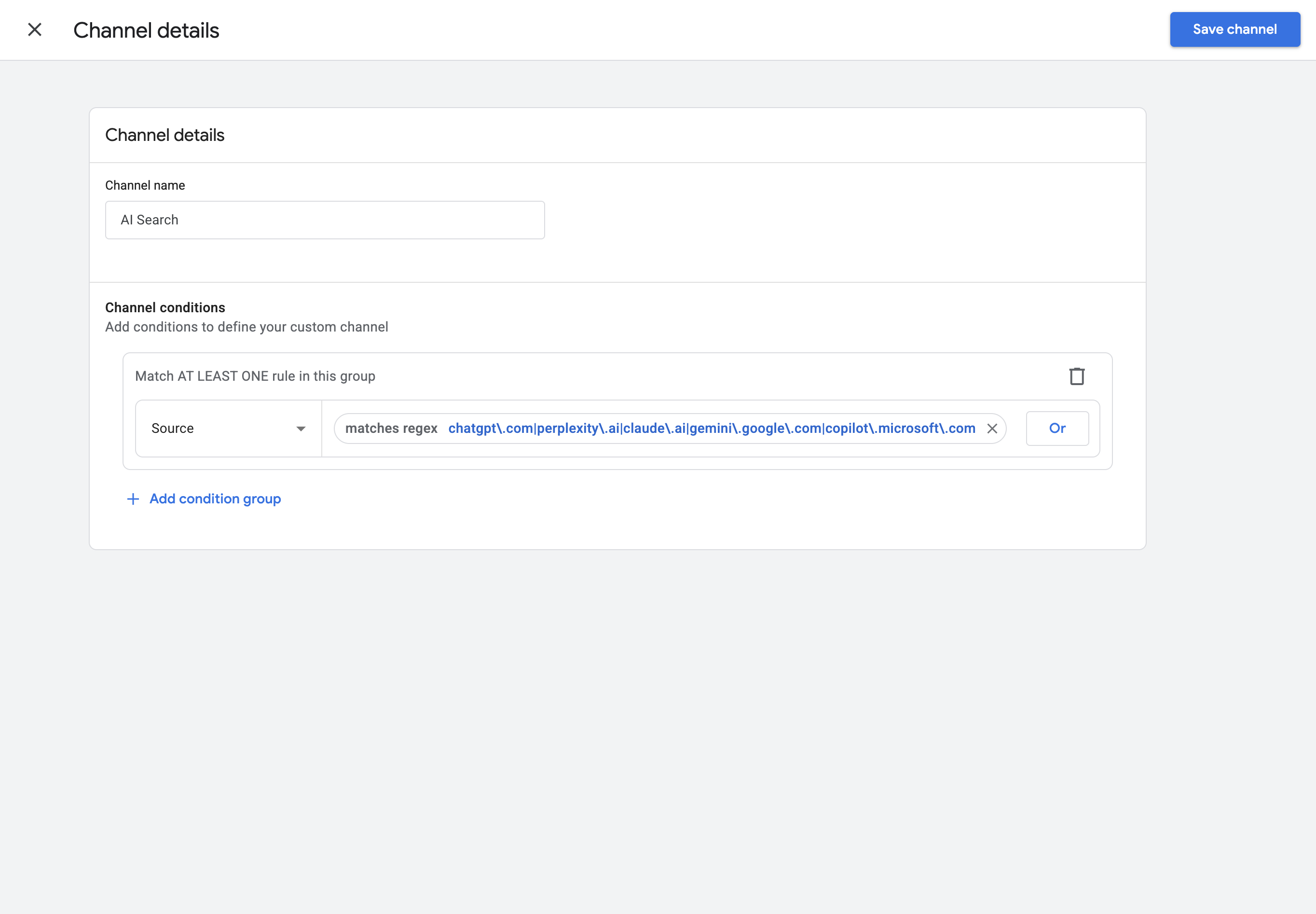
Click Add new channel, name it AI Search, and define it with the following condition:
Condition type: Source matches regex
Regex pattern:
chatgpt\.com|perplexity\.ai|claude\.ai|gemini\.google\.com|copilot\.microsoft\.comThis captures the five primary AI referral sources passing attribution data to GA4 in 2026 — and stays short enough to sit inside the condition field. Update it quarterly: append sources as they gain traffic — meta\.ai, you\.com, grok\.x\.com, or the legacy chat\.openai\.com — and check your Referral source list every month for new AI domains appearing organically. (Google’s bard\.google\.com is retired; gemini\.google\.com covers it.)
Step 4 — Save and apply
Save the channel group. GA4 applies channel groupings at query time, so a custom channel group is applied to your reports retroactively — it covers historical data as well as new sessions, not just traffic from the date you created it. (This is different from custom dimensions or events, which only collect data going forward.) You can also reproduce the same view in an Exploration report if you want more flexible dimensions and filters (see Step 6).
/assets/screenshots/ga4-ai-referral-channel-group.png Step 5 — Check your Traffic Acquisition report
Go to Reports → Acquisition → Traffic Acquisition. In the channel group selector at the top of the table, switch from the default group to your new “AI Traffic (2026)” group. You should now see an AI Search row with session data.
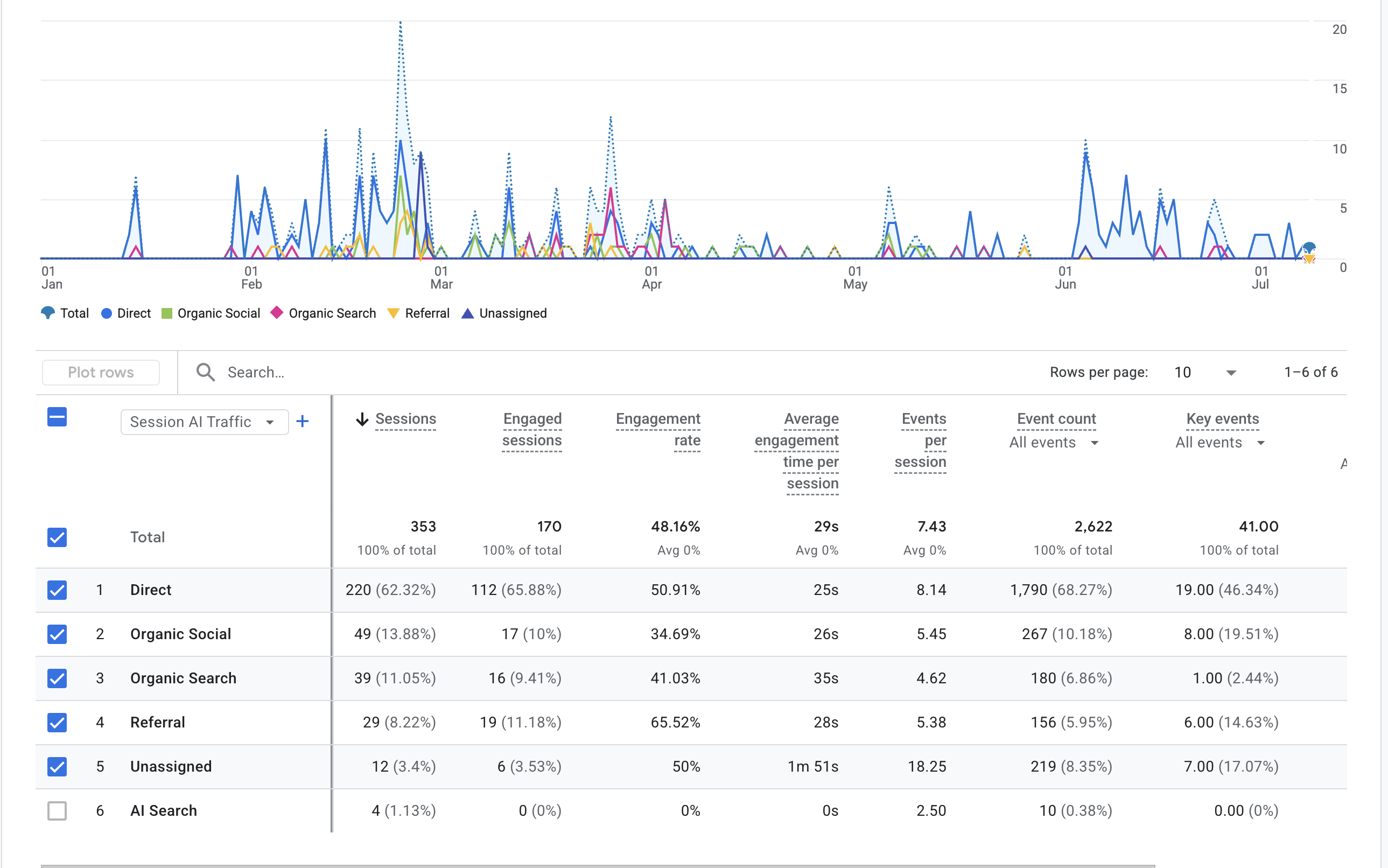
/assets/screenshots/ga4-referral-exploration.png If the row is empty, that does not mean you have no AI traffic — it means no AI traffic has passed referrer data to GA4 in the selected date range. Check the Referral channel in the default view and look manually for chatgpt.com and perplexity.ai entries.
Step 6 — Flexible analysis using Explore
For ad-hoc analysis — segmenting AI traffic by source, comparing date ranges, or slicing by landing page without touching the channel group — use a free-form exploration. Go to Explore → Free-form exploration and set the following:
- Dimension: Session source / medium
- Filter: Session source contains
chatgptORperplexityORclaudeORgeminiORcopilot - Metrics: Sessions, Engaged sessions, Conversions, Engagement rate
This surfaces AI referral data for any period where ChatGPT or Perplexity passed referrer information — useful when you want to break the numbers down more freely than the standard Traffic Acquisition report allows.
Step 7 — Add landing page as a secondary dimension
In the Traffic Acquisition report (or your Exploration), add Landing page as a secondary dimension. This tells you which specific pages on your site are being cited by AI platforms — the most actionable finding in the entire exercise. If AI is sending traffic to your blog posts but not to your services or pricing pages, that is a content gap, not a tracking gap.
What to look for once you have the data
Once your AI channel is live and populated, four things are worth tracking.
1. Volume trend, not absolute volume. The absolute number will likely be small. What matters is whether it is growing month-on-month. Flat or declining AI referrals on a growing site is a GEO signal: your content is not being cited. Growing AI referrals on a site with weak traditional SEO is a strong positive sign — it means AI engines are finding your content useful even before Google does.
2. Which pages are getting cited. The landing page dimension shows you exactly which URLs are appearing in AI responses. Cross-reference these against your key commercial pages. If AI is sending traffic to your blog posts but not to your services or pricing pages, that is a content gap: your commercial pages are not structured in a way that makes AI engines confident enough to recommend them.
3. Conversion rate versus organic. Compare your AI channel’s conversion rate against your Organic Search channel in the same date range. If your AI conversion rate is already higher — even with tiny volume — it validates that the citation strategy is working. If it is lower, the issue is usually that the AI is citing informational content and users arriving at blog posts have no clear next step.
4. Which platforms are sending traffic. ChatGPT currently dominates AI referrals (over 80% share across the top 1,000 domains). But the citation pool is largely separate across platforms — Ahrefs analysis of 15,000 prompts found that only 12% of AI-cited URLs rank in Google’s top 10 on average, and the platforms cite mostly different content. Perplexity is the outlier with 28.6% Google top-10 overlap; the rest sit around 8%. Those figures are long-tail prompts on standalone assistants rather than AI Overviews, where the same dataset put overlap at 76%. If you are only getting ChatGPT referrals and nothing from Perplexity, your content may not be structured for Perplexity’s citation patterns (which favour definition-first, citation-dense content).
Perplexity traffic in GA4: what makes it different
Perplexity is the easiest AI referral source to track in GA4 — and the one most worth isolating early.
Unlike ChatGPT, which only began passing UTM parameters in June 2025 and still drops attribution entirely from mobile app traffic, Perplexity consistently passes perplexity.ai as a referrer across both desktop and mobile. GA4 captures it reliably in your Referral channel without any workaround. If you have set up the custom channel group above, Perplexity sessions appear cleanly within the AI Search channel from day one.
What makes this traffic strategically distinct from other AI referrals is the intent signal. Perplexity searches the live web before generating every response and displays source links inline — users see which sites contributed to the answer. A click-through from Perplexity means someone read an AI-synthesised summary that named your site, evaluated the attribution, and chose to visit. That is a fundamentally different entry point from an organic Google click. The Seer Interactive analysis found Perplexity converting at 10.5% — six times Google Organic’s 1.76% on the same client.
If you’re getting zero Perplexity referrals: check that PerplexityBot can actually crawl your site (many security plugins and WAF configurations block AI crawlers by default — see the official Perplexity bot documentation for user-agent strings), then check whether your content structure matches what Perplexity’s retrieval system rewards. For the full citation-strategy breakdown — schema, content structure, entity signals, and how to track citation presence even without click-throughs — see How to Get Cited by Perplexity (And Track Your Citations).
How to track Perplexity referral traffic in GA4 (and isolate Copilot too)
If you only need to check Perplexity referral traffic — and pull Microsoft Copilot alongside it — you do not have to wait for the full channel group. Both sources pass a clean referrer, so you can isolate them directly. Here is the concrete way to track Perplexity referrals in GA4, plus the Copilot equivalent.
The hostnames GA4 sees. Perplexity arrives as perplexity.ai / referral and Copilot as copilot.microsoft.com / referral in your Session source / medium dimension. Copilot only started passing referrer data to analytics platforms in late 2025, so — like ChatGPT’s June 2025 UTM switch — anything earlier is missing from GA4. Both land in the default Referral channel until you group them, which is exactly why generative AI referral traffic gets buried: it reads as ordinary referral rows next to your backlinks and newsletter clicks, not as a distinct AI category.
The fastest check (no setup). Go to Reports → Acquisition → Traffic acquisition, switch the primary dimension to Session source / medium, and type perplexity into the table’s search box. If Perplexity has sent any traffic in your date range, perplexity.ai / referral appears with sessions, engaged sessions, and conversions attached. Repeat with copilot to see copilot.microsoft.com / referral. This is how to check Perplexity referral traffic in under a minute, before you build anything permanent.
Isolate both in an Explore report. For a cleaner, reusable view, go to Explore → Free-form and set:
- Dimension: Session source / medium (add Landing page as a second row to see which pages each platform cites)
- Filter: Session source matches regex
perplexity\.ai|copilot\.microsoft\.com - Metrics: Sessions, Engaged sessions, Conversions, Engagement rate
That regex isolates Perplexity and Copilot specifically. If you want every AI source in one view instead, drop the filter and reuse the five-source pattern from the channel group below.
Fold them into your AI channel group. Perplexity and Copilot are already two of the five primary sources in the AI Search channel regex from the step-by-step setup above:
chatgpt\.com|perplexity\.ai|claude\.ai|gemini\.google\.com|copilot\.microsoft\.comSo once that channel group exists, Perplexity and Copilot referrals roll into the AI Search row automatically — no separate configuration needed. Because GA4 applies channel groups at query time, that grouping covers your historical Perplexity and Copilot sessions too, not just traffic from the day you created it. Keep watching your Referral list monthly: Copilot also shows up from copilot.com, and if you see it earning sessions, append copilot\.com to the pattern.
One thing referral tracking cannot tell you is how often Perplexity names your brand without sending a click — the zero-click case. To see your brand’s mentions and citations inside Perplexity answers directly, pair GA4 with a citation check; how to see whether your business appears in ChatGPT and Perplexity walks through monitoring that presence.
What low AI referral numbers actually mean
If you set up the tracking and find near-zero AI referral traffic, there are three likely causes — each with a different fix.
Two further causes sit outside GA4’s configuration: assistants that strip the referrer, which is handled in attributing conversions from AI assistants, and European visitors who decline consent, which is handled in Consent Mode v2 and AI referral traffic.
Cause 1 — Your content is not structured for citation. AI engines consistently cite content with clear definitions, direct answers to specific questions, and structured formatting. A page with long flowing prose, no subheadings, and no FAQ section is difficult for an AI to extract a quotable answer from. The fix is content restructuring, not more content. For the schema layer specifically, see Structured Data for AI Search; if you publish video, how video content earns AI citations covers the transcript and metadata signals that turn YouTube into an AI referral source.
Cause 2 — Your entity is not established. AI engines are more likely to cite sources they recognise as authorities on a topic. If your domain has no Knowledge Panel, limited external mentions, and no consistent entity signals across the web, your content may be accurate but unverifiable from the model’s perspective. The fix is E-E-A-T and entity building — author bylines, external press mentions, structured About page data. See Why Entities Matter More Than Keywords for AI Search for the framework.
Cause 3 — You are not targeting the right queries. AI traffic concentrates on decision and comparison queries, not awareness queries. The Previsible analysis found pricing and tools pages receive 4–9× higher AI presence than site averages — because AI users arrive with defined problems and use AI to compare solutions. If your content strategy is 80% top-of-funnel awareness content and 20% decision content, you are optimising for a channel that AI does not drive heavily.
Three things to do this week, depending on what you find
If you find AI traffic and it is converting well: document which pages are being cited, analyse their structure, and replicate that structure across your highest-value commercial pages. The pages already getting cited are your GEO templates.
If you find AI traffic and it is not converting: the issue is CTA misalignment. The cited pages are likely informational — they answer a question but do not offer a clear next step. Add a contextual CTA to each cited page that reflects the funnel stage of someone arriving from an AI response: they already understand the problem, so skip the awareness pitch.
If you find very little or no AI traffic: run your priority content pages through a GEO readiness check. Does each page have a definition block in the opening paragraph? Does it directly answer the question implied by its primary keyword? Are there structured FAQ questions using natural language? If not, those are your first fixes before any broader content strategy changes. The AEO Article Analyzer scores any article against the 10 criteria AI engines use to decide what to cite — 0–100 readiness score, pass/fail per criterion, top-3 highest-impact fixes, in under 30 seconds.
The measurement gap is the strategy gap
The teams who will build the strongest GEO presence over the next 18 months are not the ones who wait until AI traffic is large. They are the ones setting up measurement now — when the data is thin enough to act on cleanly — and using what they find to shape content decisions before competitors are even looking.
The regex filter above takes 15 minutes. The insight it surfaces — which of your pages AI engines are already citing, at what conversion rate, from which platforms — is the most actionable signal available in SEO right now.
Tracking the referral channel is one layer of a wider measurement problem. The zero-click search data explains why so much AI exposure never produces a click at all, and the B2B AI search buying-journey breakdown covers how those un-clicked touchpoints still move deals through a multi-touch funnel. Wiring all of it into one attribution model is what full-funnel tracking is built to do.
FAQ
Does GA4 automatically track AI traffic?
No. GA4 has no native AI channel category. Traffic from ChatGPT, Perplexity, Claude, and Gemini is spread across the Referral, Direct, and Unassigned channels in the default configuration. You need to create a custom channel group using a regex filter on Source to isolate and measure it properly. The setup takes approximately 15 minutes (see Steps 1–7 above).
Why does some ChatGPT traffic show up as Direct in GA4?
ChatGPT only began appending utm_source=chatgpt.com to desktop citation links in June 2025. Traffic from ChatGPT’s mobile app, and any citations generated before that date, does not pass referrer information and appears as Direct in GA4. This means measured AI traffic is an undercount of actual AI traffic — typically the visible portion of a larger signal that also leaks into Direct and Unassigned.
How do I check Perplexity referral traffic in GA4?
Open Reports → Acquisition → Traffic acquisition, set the primary dimension to Session source / medium, and type perplexity into the table search box. If Perplexity sent traffic in your date range, perplexity.ai / referral appears with sessions and conversions — the fastest way to check Perplexity referral traffic with zero setup. For a reusable view, build an Explore free-form report filtered to Session source matching regex perplexity\.ai, and add Landing page as a second dimension to see which of your pages Perplexity is citing. Perplexity passes its referrer reliably across desktop and mobile web, so this captures nearly all its click-throughs.
Does Copilot show up as a Perplexity-style referral in GA4?
Yes. Microsoft Copilot passes a referrer just like Perplexity does, appearing as copilot.microsoft.com / referral in your Session source / medium dimension (some sessions also arrive from copilot.com). Copilot only began passing referrer data to analytics platforms in late 2025, so earlier visits are missing — the same undercount that affects every AI source. Both Perplexity and Copilot are already covered by the five-source AI Search channel-group regex in this guide, so once that group is live they roll into the same AI channel automatically, no separate rule required.
How can I check Perplexity referral traffic specifically?
Perplexity is the easiest AI source to isolate in GA4: it consistently passes perplexity.ai as a referrer across both desktop and mobile, unlike ChatGPT. After setting up the AI Search channel group above, filter to Source = perplexity.ai and add Landing page as a secondary dimension to see exactly which of your pages Perplexity is citing. For the citation-strategy deep-dive (why your pages get cited and how to track citation presence even without click-throughs), see How to Get Cited by Perplexity.
What is a good AI referral traffic conversion rate?
There is no published benchmark worth planning against — only two narrow measurements. Seer Interactive’s single B2B client recorded ChatGPT at 15.9% and Perplexity at 10.5% against 1.76% for Google Organic, on an AI arm of roughly 11,000 sessions against 14 million from Google. Rankability’s analysis of Microsoft Clarity data across 1,200 sites recorded AI sign-up conversion at 1.66% against 0.15% — a different action, in a different industry. What survives both is a direction, not a number: AI-referred traffic converts above organic, by a multiple that varies with ICP. Measure your own; anyone quoting 15.9% as a target is quoting one company’s quarter.
Can I track AI Overview clicks in GA4?
Not directly. Google AI Overview clicks are categorised alongside standard organic search in GA4, and Google Search Console does not provide a clean filter to separate them. Google launched dedicated Search Console generative-AI performance reports (covering AI Overviews and AI Mode) in June 2026, but these report impressions only — no click, CTR, or query breakdown yet — and are still rolling out to a subset of properties. The practical workaround: monitor the broader AI Search channel (which captures ChatGPT, Perplexity, Claude, Copilot referrals) and use GSC’s AI presence data qualitatively alongside it.
How often should I update my AI traffic regex?
At minimum quarterly. New AI platforms emerge regularly and existing ones change how they pass referrer data. The regex above captures the five primary AI referral sources as of 2026. Practical maintenance: add grok\.x\.com and you\.com for broader coverage, and check your Referral source list in GA4 every month for new AI domains appearing organically — adding them to the regex as you spot them keeps the channel grouping accurate without a quarterly rebuild.
What is the difference between AI referral traffic and AI Overview traffic?
AI referral traffic comes from standalone AI platforms — ChatGPT, Perplexity, Claude — when a user clicks a link cited in a chat response. It passes through a separate domain and appears in GA4 as Referral traffic. AI Overview traffic comes from Google’s AI-generated summaries at the top of search results. It passes through Google’s standard organic channel and currently cannot be isolated in GA4 without manual annotation in Search Console. The two are structurally different but both reflect the broader shift toward AI-mediated discovery.
Is AI referral traffic actually worth optimising for if volume is so small?
Yes, for two reasons. First, the conversion math: Seer Interactive’s B2B client saw AI sources drive 1,370 conversions despite making up just 0.07% of organic traffic. At a $150 average conversion value, that is over $205,000 in pipeline from traffic most teams aren’t tracking. Second, AI traffic concentrates on commercial pages — pricing and tools pages receive 4–9× higher AI presence than site averages per Previsible’s analysis — meaning the volume that does arrive is disproportionately high-intent.