 Nadia Mohamed
Technical SEO
Pagination SEO: Making Pagination and Infinite Scroll Crawlable
Pagination is where a UX decision quietly becomes an indexing decision. The moment your archive, category, or search-results template splits across multiple views, you are choosing — usually without meaning to — whether a crawler can reach page 2 at all. I ship a lot of these templates, and infinite scroll is the pattern that breaks most often. This is a spoke under SEO for engineers: the general render-path argument lives there, and here I stay on the pagination and infinite-scroll specifics.
Pagination SEO is the practice of exposing a multi-page sequence — archives, category listings, search results — to crawlers as a set of distinct, indexable URLs connected by real
<a href>links, so that every item in the sequence can be discovered, indexed, and cited, regardless of how the interface loads it for a human.
Key takeaways
- Every page in a sequence needs its own crawlable URL. Google’s pagination guidance is to “give each page a unique URL” (such as a
?page=nparameter) and link between them with<a href>tags. - Infinite scroll and “load more” are the classic trap. Google’s crawlers “don’t ‘click’ buttons and generally don’t trigger JavaScript functions that require user actions” — so content that only arrives on scroll or click is invisible to them.
rel="next"/rel="prev"is dead as an indexing signal. Google confirms it “no longer uses these tags”; it was retired years before the 2019 announcement.- Canonical each page to itself, not to page 1. Google is explicit: “Don’t use the first page of a paginated sequence as the canonical page. Instead, give each page its own canonical URL.”
- The safe pattern is a hybrid: infinite-scroll UX layered on top of real, linkable paginated URLs — the interface loads on scroll, but the URLs exist and the
<a href>links are in the raw HTML.
Why paginated content needs real, crawlable URLs
The whole point of pagination, from a crawler’s perspective, is discovery. Googlebot finds page 2 the same way it finds any page: it parses the HTML of page 1 and follows the links it finds there. If the only route to page 2 is a button that fires a fetch() on click, there is no link to follow, and everything past the first view is undiscoverable.
Google’s pagination documentation reduces to two mechanical requirements, and both are things you control in the template:
- Give each page a unique URL. A distinct address like
?page=2or/blog/page/2/— one that returns the right content when requested directly, cold, with no prior interaction. - Link between pages with
<a href>tags. “Include links from each page to the following page using<a href>tags. This can help Googlebot find subsequent pages.”
That second requirement is the one frameworks fumble. A client-side router will happily give you pagination that looks right — the URL in the address bar even changes to ?page=2 — while the navigation is actually a JavaScript onClick handler with no real anchor underneath. To a crawler, that is not a link.
// Invisible to crawlers — the URL updates via JS, but there is no href to follow
<button onClick={() => goToPage(2)}>Next</button>

// Crawlable — a real anchor the bot can queue and request directly
<a href="/blog/?page=2" onClick={handleClientNav}>Next</a>
The rule that decides link crawlability — a link is only a link if it is an <a> element with an href — is the same one covered in JavaScript SEO, so I won’t re-litigate it here. For pagination the consequence is specific and expensive: get it wrong and you don’t lose one page, you lose the entire tail of the sequence and every item that only appears on it.
The infinite scroll failure mode
Infinite scroll and “load more” are the same failure dressed two ways: content that exists only after a user action a bot never performs. Google states it plainly — its crawlers “don’t ‘click’ buttons and generally don’t trigger JavaScript functions that require user actions to update the current page contents.” A crawler does not scroll to the bottom of your feed, and it does not press Load more. Whatever those events would have fetched simply never enters the crawl.
It is worth separating two things that get conflated here, because the distinction is the whole point. Googlebot rendering your JavaScript is largely a solved problem; Googlebot interacting with it is not.
Read that correctly: Google renders your scripts, but rendering a page is not the same as driving it. The scroll listener never fires for a bot, so the second batch of items never loads. And the AI crawlers make it worse — GPTBot, OAI-SearchBot, ClaudeBot, and PerplexityBot read raw HTML as text and don’t run a headless browser at all, so they never even reach the render step, let alone the scroll event. The curl -A "GPTBot" check from the JavaScript SEO guide is the fastest confirmation — request the URL as a bot and see how many of your items are actually in the response:
# How many list items survive without any scroll or click?
curl -sA "GPTBot" "https://example.com/blog/?page=2" | grep -c "article-card"
If that count is zero on a URL that is full of cards in your browser, the content is arriving via an interaction no crawler will perform. For discovery, Google’s own fallback is to expose the full set another way: “consider using a sitemap file” so bots can find every item even when the interface only reveals them on scroll. A sitemap is a good backstop — but it is not a substitute for the paginated URLs themselves, because a URL a crawler can’t reach through an on-page link is a weak discovery target no matter what your sitemap says.
rel=“next” / rel=“prev”: stop reaching for it
If you learned pagination SEO before 2019, your instinct is to reach for rel="next" and rel="prev" link elements in the <head>. Don’t bother — they do nothing for Google anymore. Google’s current documentation is unambiguous: “Google no longer uses these tags, although these links may still be used by other search engines.”
The retirement is older than most people realize. Google announced it in March 2019, but confirmed at the time that it had actually stopped using the signal years earlier — the markup had been inert for a long stretch before anyone was told. So this isn’t a recent deprecation to schedule a migration around; it’s a signal that has been dead the entire time you’ve been maintaining it.
What replaced it is nothing exotic — it’s the ordinary crawl. Google discovers and understands a paginated sequence by following the <a href> links between pages, exactly as described above. There is no special pagination markup to add on top. If you already emit rel="next"/rel="prev", leaving them in place is harmless (other engines may still read them), but they should never be the thing your pagination depends on. The real <a href> links are load-bearing; the rel hints are not.
Canonical handling for a paginated series
Canonicalization is where I see well-intentioned pagination get actively de-indexed. The tempting move — because pages 2, 3, and 4 feel “less important” than page 1 — is to point every paginated page’s canonical back at page 1. That is precisely the mistake Google warns against.
Google’s guidance is a single sentence, and it is worth pinning to the wall: “Don’t use the first page of a paginated sequence as the canonical page. Instead, give each page its own canonical URL.”
Here is why it matters mechanically. A canonical tag tells Google “this other URL is the real version of this page.” If ?page=2 canonicalizes to ?page=1, you are telling Google that page 2 is page 1 — so the unique items that only appear on page 2 have no canonical home of their own, and Google is free to drop them from the index entirely. You have volunteered your own deep content for removal.
Each page in the sequence gets a self-referencing canonical — page 2 points at page 2:
<!-- On /blog/?page=2 — canonical points at itself, not page 1 -->
<link rel="canonical" href="https://example.com/blog/?page=2" />

<!-- On /blog/?page=3 -->
<link rel="canonical" href="https://example.com/blog/?page=3" />
Two adjacent points that trip people up. First, this is different from the advice for filtered or sorted variants of the same list (?sort=price, ?color=blue), where canonicalizing to a clean base URL is often correct — pagination is not faceting, and the pages carry genuinely distinct content. Second, keep the canonical in the server-rendered HTML: a canonical injected client-side is subject to all the same render-timing problems as any other JavaScript-dependent tag, which is the render-path concern the JavaScript SEO guide covers in full.
The pattern I ship: infinite scroll over real paginated URLs
You do not have to choose between the infinite-scroll UX product wants and the crawlable pagination SEO needs. The move is to build both, with the URLs as the foundation and the scroll behavior as progressive enhancement on top. It is also exactly what Google’s own infinite-scroll guidance has recommended for years — “make sure each item or group of items has its own unique URL” — so that the sequence is bookmarkable, shareable, and crawlable independent of the scroll.
The shape is always the same:
- Server-render real paginated URLs.
/blog/?page=2(or/blog/page/2/) returns that slice of content directly, cold, in the initial HTML — no JavaScript required to see it. - Put a real
<a href>“next” link in every page’s markup. This is the crawl path. It’s in the raw HTML, so Googlebot follows it and AI crawlers read it. - Enhance with infinite scroll as an interception layer. Client-side JavaScript intercepts that link (or watches an
IntersectionObserversentinel), fetches the next page, and appends it — updating the URL with the History API as the user scrolls.
The human gets a seamless feed; the crawler gets a plain, boring, fully linkable set of URLs. Concretely, the “next” control is an anchor first and a scroll trigger second:
---
// Blog listing template — the paginated URL is real and server-rendered.
// Astro's paginate() gives you page.url.next as a genuine route.
const { page } = Astro.props;
---
<ul>
  {page.data.map((post) => <li><a href={`/insights/${post.slug}/`}>{post.title}</a></li>)}
</ul>

{page.url.next && (
  <!-- Real anchor: the crawl path. JS below upgrades it to infinite scroll. -->
  <a href={page.url.next} rel="next" class="load-more" id="load-more">
    Load more
  </a>
)}
// Progressive enhancement: intercept the real link, do not replace it.
const link = document.getElementById('load-more');
const observer = new IntersectionObserver(async ([entry]) => {
if (!entry.isIntersecting) return;
const res = await fetch(link.href); // the same crawlable URL
const html = await res.text();
appendItems(html); // add the next slice
history.pushState({}, '', link.href); // keep the URL honest
updateNextLink(html); // move the anchor forward
});
observer.observe(link);The test for whether you’ve done this right is the same curl from earlier: request ?page=2 as GPTBot and confirm the items and the next <a href> are both in the response. If they are, every class of bot can walk the entire sequence one link at a time, and the infinite scroll is pure UX sugar that no crawler ever needs to taste.
A five-minute pagination crawl audit
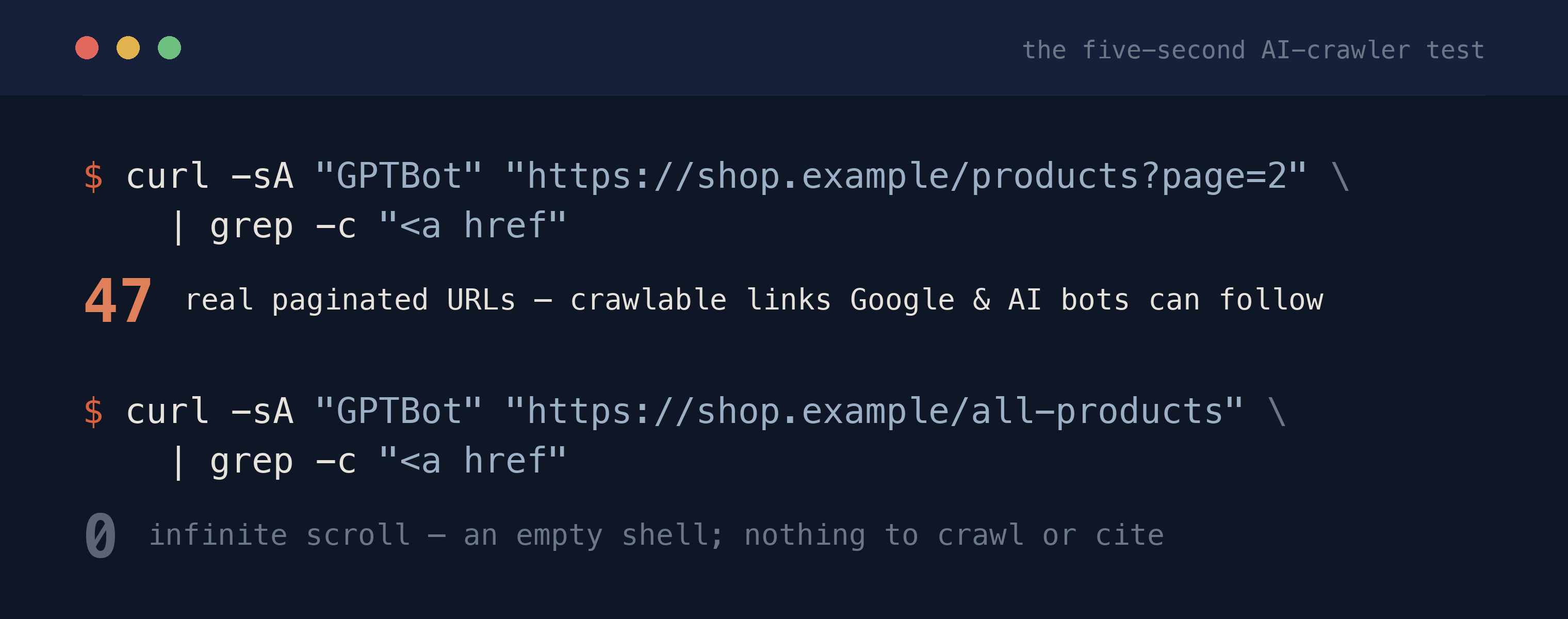
/assets/screenshots/pagination-seo/curl-gptbot-page2.png When I inherit a paginated template, I run these checks in order. Any one of them failing is a discovery hole.
- Direct-load a deep page. Open
?page=3in a fresh tab with JavaScript disabled. If the content is there, the URL is real. If it’s blank, pagination depends on interaction. curlit as a bot.curl -sA "GPTBot" "<url>?page=2"and grep for a known item and for the next-page<a href>. Both must be present.- Confirm the next link is an anchor. Inspect the “next” / “load more” control. It must be
<a href="…">, not a<button>or a<div onClick>. - Check the canonical on page 2+. View source on
?page=2; the canonical must point at?page=2, never at page 1. - Verify the sitemap lists items, not just page 1. As Google’s backstop, deep items should be discoverable there too — but only as a supplement to the crawlable links, never as the sole route.
Where this fits
Pagination is one crawl-path problem inside the larger render-path discipline. The general rule — content and links must exist in the raw HTML before any script runs — is the through-line of JavaScript SEO, and the whole crawlable-to-citable arc it sits under is the SEO for engineers pillar. Pagination SEO is where that rule has teeth for anyone shipping an archive, a catalog, or a search-results page: get the URLs and the <a href> links right, and every item in the sequence stays discoverable, indexable, and citable — no matter how smoothly the interface scrolls.
FAQ
Is infinite scroll bad for SEO?
Infinite scroll isn’t inherently bad, but the common implementation is — one where content only loads on scroll and there are no real URLs behind it. Google’s crawlers don’t scroll or click, so any items that appear only after a scroll event are invisible to them. The fix is to back the infinite scroll with real, server-rendered paginated URLs (?page=2) linked by <a href> tags, and treat the scroll behavior as progressive enhancement on top.
Does Google still use rel=“next” and rel=“prev”?
No. Google’s documentation states plainly that it “no longer uses these tags.” Google announced the retirement in March 2019 and confirmed it had actually stopped using the signal years earlier. Other search engines may still read them, so leaving them in place is harmless, but they should never be what your pagination relies on — the real <a href> links between pages are what Google actually follows.
Should paginated pages canonical to the first page?
No. Google is explicit: “Don’t use the first page of a paginated sequence as the canonical page. Instead, give each page its own canonical URL.” Canonicalizing page 2 to page 1 tells Google that page 2 is a duplicate of page 1, which can push the unique items on page 2 out of the index entirely. Every page in the sequence should have a self-referencing canonical pointing at itself.
How do I make pagination crawlable in a JavaScript app?
Server-render a unique URL for each page (like ?page=n) so it returns the correct content when requested directly, and include a real <a href> link to the next page in that server-rendered HTML. If your router navigates via onClick without a real anchor, crawlers can’t follow it. You can still layer infinite scroll on top by intercepting the real link with JavaScript — the URL and the anchor just have to exist in the raw HTML first.
How can I test whether my paginated content is crawlable?
Request a deep page as a bot and check what comes back: curl -sA "GPTBot" "https://example.com/blog/?page=2" and confirm both your list items and the next-page <a href> are in the response. As a second check, open ?page=2 directly with JavaScript disabled — if the content renders, the URL is real; if it’s blank, your pagination depends on an interaction that crawlers won’t perform.
Do I still need a sitemap if my pagination is crawlable?
A sitemap is a useful backstop that Google recommends for helping it find every item, especially with infinite scroll. But it’s a supplement, not a substitute: a URL that a crawler can only reach through a sitemap — with no on-page <a href> pointing to it — is a weaker discovery and ranking target than one reached through real links. Ship crawlable paginated links first, then add the sitemap on top.