 Nadia Mohamed
Technical SEO
robots.txt for Developers: SEO Rules, Copy-Paste Examples and AI Crawlers
For SEO, a robots.txt file does one job: it tells compliant crawlers which URL paths on your host they may fetch. It controls crawling, not indexing, so it is the right tool for steering crawl budget and AI bots and the wrong tool for keeping a page out of Google.
This guide covers the syntax and precedence rules that decide what a crawler actually does, a tested reference for Disallow patterns, the Sitemap line, copy-paste files for WordPress, Next.js, Astro and a SaaS app, and how to set a per-bot policy for GPTBot, ClaudeBot and PerplexityBot. It is a spoke of the SEO for engineers series, and every example file below was run through Google’s own open-source parser before it went on the page.
Key takeaways
robots.txtcontrols crawling, not indexing. Google is explicit that it “is not a mechanism for keeping a web page out of Google”. A disallowed URL can still be indexed if other pages link to it.Disallowis a prefix match, and that bites.Disallow: /searchalso blocks/search-engine-optimisation-guide. Anchor with$or add a trailing slash, then test the file before you ship it.- Precedence is by specificity, not by order. Google applies the rule with the longest matching path and, on a tie, the least restrictive one. Python’s standard-library parser does neither, so it can pass a file Google reads differently.
- The
Sitemapline belongs at the end, outside every group. Google ignores it when grouping, so aSitemapline between twoUser-agentgroups can silently merge them. - AI crawlers are per-vendor, per-purpose switches. GPTBot, ClaudeBot and Google-Extended cover training; OAI-SearchBot, Claude-SearchBot and PerplexityBot cover AI search. You can block the first set and keep the second.
What robots.txt actually controls
Start with the mental model, because almost every robots.txt mistake is a category error. The file is a set of instructions about fetching. When a compliant crawler wants a URL, it checks whether a rule disallows that path, and if so it does not request the page. That is the entire mechanism.
It says nothing about whether the URL can appear in search results, whether it gets a snippet, or whether an already-known page stays or goes. Google states it plainly: a robots.txt file “is used mainly to avoid overloading your site with requests; it is not a mechanism for keeping a web page out of Google.”
The consequence catches people out: “A page that’s disallowed in robots.txt can still be indexed if linked to from other sites.” Google’s specification says the same from the other side: it “can’t index the content of pages which are disallowed for crawling, but it may still index the URL and show it in search results without a snippet.”
So the correct use of robots.txt for SEO is narrow, and it is about crawl economy. Keep bots out of infinite faceted-search spaces, staging paths, internal search results and low-value parameter URLs, so they spend their crawl budget on pages that matter. It is not the tool for privacy, and it is not the tool for removal.
The syntax that matters
The file lives at https://yourdomain.com/robots.txt: one per host, at the root, nowhere else. A crawler groups the rules by User-agent and applies the group that matches its token. Four fields carry all the weight, and they are the only four Google supports:
User-agent: *
Disallow: /admin/
Disallow: /*?sessionid=
Allow: /admin/public-report.pdf

Sitemap: https://example.com/sitemap.xmlUser-agentnames the crawler a group applies to.*is the fallback for any bot without its own group. A crawler obeys the single most specific group that matches its token, not all matching groups combined. You can stack severalUser-agentlines above one set of rules to share them.Disallowblocks a path prefix.Disallow: /admin/blocks everything under/admin/. An emptyDisallow:blocks nothing, which is how you say “allow everything”.Allowcarves an exception out of a broaderDisallow, so you can block a directory but expose one file inside it.Sitemappoints crawlers at your sitemap. It sits outside the user-agent groups, and you can list several. The section on the Sitemap directive below covers the rules.
Wildcards handle parameter noise: * matches any sequence of characters and $ anchors the end of a URL, so Disallow: /*.pdf$ blocks PDF URLs specifically. Paths are case-sensitive; field names are not.
Anything else is ignored by Google. The spec says so directly: “other fields such as crawl-delay aren’t supported”. Some other crawlers do read Crawl-delay (Anthropic documents it, covered below), so it is not useless, but it will never slow Googlebot down.
Precedence: specificity, then the least restrictive rule
When an Allow and a Disallow both match a URL, which wins? Google’s rule is two-stage: “crawlers use the most specific rule based on the length of the rule path,” and “in case of conflicting rules, including those with wildcards, Google uses the least restrictive rule.”
So the longer, more specific path wins first, and when two rules are equally specific the Allow wins. The order of lines in the file does not matter to Google. This pair exposes the quarterly folder while blocking the rest of /reports/:
User-agent: *
Disallow: /reports/
Allow: /reports/quarterly/
I ran that file through Google’s open-source robots.txt parser (the library Google says is “also used in Google Search”), built from commit 22b355f. It returned ALLOWED for /reports/quarterly/q3.html and DISALLOWED for /reports/annual.html, as the spec says it should.
The operational rules most guides skip
These come from Google’s specification, and each one has caused a real incident somewhere:
| Situation | What Google does |
|---|---|
File returns 2xx | Processes the file as served |
File returns 4xx (except 429) | Treats it as if no robots.txt exists, so no crawl restrictions |
File returns 5xx | Stops crawling the site for the first 12 hours, then uses the last good copy for up to 30 days |
| Redirect chain | Follows at least five hops, then treats the file as a 404 |
| File over 500 KiB | Ignores everything after the limit |
| Changes to the file | Generally cached for up to 24 hours |
All six rows are from How Google interprets the robots.txt specification, which was last updated on 31 August 2026 when I read it. The 5xx row is the one to put in your monitoring: a robots.txt that starts erroring is a site-wide crawl stop, not a missing file. The crawl budget guide covers the 429 variant, where a WAF rate-limits the file.
Two more rules from the same page matter for multi-host setups. A robots.txt applies only to the host, protocol and port it is served from, so app.example.com needs its own file. And do not disallow the CSS and JavaScript that render your pages: blocking those resources stops Googlebot rendering the page, a self-inflicted JavaScript SEO failure that often follows a “tidy up robots.txt” ticket.
Disallow reference: what each pattern really blocks
Most robots.txt bugs are a Disallow rule that matches more, or less, than its author thought. Every row below was run through Google’s open-source parser, and the results match the path-matching examples in Google’s specification.
| Rule | Blocks | Does not block |
|---|---|---|
Disallow: / | Every URL on the host | Nothing |
Disallow: (empty) | Nothing | Everything |
Disallow: /admin/ | /admin/, /admin/users | /admin, /Admin/, /administrator |
Disallow: /admin | /admin, /admin/, /administrator, /admin.php | /Admin |
Disallow: /search | /search, /search?q=x, /search-tips | /blog/search |
Disallow: /*? | Any URL with a query string, such as /shoes?page=2 | /shoes |
Disallow: /*?sort= | /shoes?sort=price | /shoes?color=red&sort=price |
Disallow: /*sort= | /shoes?sort=price, /shoes?color=red&sort=price | /shoes |
Disallow: /*.pdf$ | /files/a.pdf | /files/a.pdf?v=2, /files/a.PDF |
Disallow: /$ | The homepage only | /about |
Three patterns account for most of the surprises:
- The missing trailing slash.
Disallow: /adminis a prefix, so it also blocks/administratorand/admin.php. If you mean the folder, write/admin/. - Parameter position.
/*?sort=only matches whensortis the first parameter. Use/*sort=to catch it anywhere in the query string. - The
$anchor and query strings./*.pdf$stops matching the moment a?v=2cache-buster is appended, so versioned file URLs slip through.
Case sensitivity is the fourth. /Admin/ and /admin/ are different paths to a crawler, even if your server treats them as the same page.
The Sitemap directive
The Sitemap line is the cheapest crawl guidance you can give, and it has more rules than it looks. From Google’s specification:
- It must be a fully qualified URL, including protocol and host.
Sitemap: /sitemap.xmlis not valid. - The sitemap “doesn’t have to be on the same host as the robots.txt file”, so a sitemap on a CDN host is fine.
- You can list multiple
Sitemaplines, “with no limit to the number of sitemaps you can include.” - It “isn’t tied to any specific user agent and may be followed by all crawlers, provided it isn’t disallowed for crawling.”
The fourth rule has a trap in it. Google’s parser skips Sitemap lines when it builds groups, so a Sitemap line does not end a group. Google’s own example is this file:
user-agent: a
sitemap: https://example.com/sitemap.xml

user-agent: b
disallow: /
Google reads that as one group covering both a and b, so both are blocked from the whole site. I confirmed it with Google’s parser: DISALLOWED for both agents. Then I ran the same file through two parsers developers commonly use in tests. The npm package robots-parser (3.0.1) and Python’s urllib.robotparser (3.11) both reported a as allowed. Neither reproduces Google’s behaviour here.
The fix is a habit: put every Sitemap line at the end of the file, after the last group, with a blank line above it. Every example on this page does that.
robots.txt examples you can copy
Each file below was run through Google’s open-source parser against the URLs in its comments before it was published. Adjust the paths to your own URL structure, then re-test, because a robots.txt copied between sites is a common source of accidental blocks.
Allow everything
The default when no file exists, written out so the Sitemap line has somewhere to live:
User-agent: *
Disallow:

Sitemap: https://example.com/sitemap.xml
Google’s guide to creating the file confirms that “unless you specify otherwise in your robots.txt file, all files are implicitly allowed for crawling.” The file above changes nothing about access; it exists for the sitemap.
Block everything (staging only)
User-agent: *
Disallow: /
Use this on staging and preview hosts, never on production. It is also not enough on its own for a staging site that is already indexed, for the reason in the noindex section below: password-protect staging instead, and treat this file as a backstop. Shipping this file to production by mistake is the classic site migration failure, which is why the Next.js and Astro examples below switch it on from an environment variable instead of a copied file.
WordPress
WordPress serves a virtual robots.txt from the core function do_robots(). Its output is User-agent: *, a Disallow for the admin path and an Allow for admin-ajax.php. Since WordPress 5.5, core’s WP_Sitemaps::add_robots() appends a Sitemap line for the sitemap index when the site is public. The index lives at /wp-sitemap.xml when pretty permalinks are on.
A version that also keeps crawlers out of internal search and comment-reply URLs:
User-agent: *
Disallow: /wp-admin/
Allow: /wp-admin/admin-ajax.php
# Internal search results (?s= by default, /search/ with pretty search URLs)
Disallow: /?s=
Disallow: /search/
# Comment-reply links duplicate every post
Disallow: /*?replytocom=

Sitemap: https://example.com/wp-sitemap.xml
Tested: /wp-admin/options.php, /?s=robots and /blog/post/?replytocom=12 are blocked. /wp-admin/admin-ajax.php, /blog/post/ and /wp-content/themes/x/style.css are allowed, so theme CSS stays crawlable for rendering. If an SEO plugin writes its own sitemap, swap the Sitemap URL for the plugin’s index.
One WordPress-specific trap: since version 5.3, the “discourage search engines” setting no longer writes Disallow: /. The do_robots() changelog says it now uses a robots meta tag instead. If you are checking a staging site for that setting, look for the meta tag, not the file.
Next.js (App Router)
Next.js generates the file from app/robots.ts, which returns a MetadataRoute.Robots object. userAgent accepts an array, and sitemap takes a string or an array. Driving it from an environment variable keeps staging and production from sharing a file:
// app/robots.ts
import type { MetadataRoute } from 'next';

const SITE = 'https://example.com';

export default function robots(): MetadataRoute.Robots {
  if (process.env.SITE_ENV !== 'production') {
    return { rules: { userAgent: '*', disallow: '/' } };
  }

  return {
    rules: [
      { userAgent: '*', allow: '/', disallow: ['/api/', '/account/'] },
      { userAgent: ['GPTBot', 'ClaudeBot', 'Google-Extended'], disallow: '/' },
    ],
    sitemap: `${SITE}/sitemap.xml`,
  };
}
SITE_ENV is a variable you set yourself in each deployment environment. Per the Next.js docs, robots.ts “is cached by default unless it uses a Request-time API or dynamic config option”, so a build-time variable is the right fit. The Next.js SEO guide covers the matching app/sitemap.ts.
Astro
The simplest option in Astro is a static public/robots.txt, which is copied into the build output unchanged. This site does exactly that. Here is an abridged version of the live file at nadiamohamed.me/robots.txt, which welcomes AI crawlers on purpose:
User-agent: *
Allow: /

User-agent: GPTBot
Allow: /

User-agent: OAI-SearchBot
Allow: /

User-agent: ClaudeBot
Allow: /

User-agent: PerplexityBot
Allow: /

Sitemap: https://nadiamohamed.me/sitemap-index.xml
Sitemap: https://nadiamohamed.me/video-sitemap.xml
The second Sitemap line is there because the video sitemap should be discoverable by crawlers that read robots.txt but never expand a sitemap index. The Allow: / lines for named bots are redundant with the * group in pure access terms. They are there to make the policy explicit, so nobody “tidies” the file into a block later.
If you need a staging switch, replace the static file with an endpoint. I built this on the Astro version this site runs (5.18.2) with public/robots.txt removed, because the two would collide:
// src/pages/robots.txt.ts
import type { APIRoute } from 'astro';

export const GET: APIRoute = ({ site }) => {
  const staging = import.meta.env.PUBLIC_SITE_ENV === 'staging';
  const lines = staging
    ? ['User-agent: *', 'Disallow: /']
    : [
        'User-agent: *',
        'Disallow: /api/',
        '',
        'User-agent: GPTBot',
        'Disallow: /',
        '',
        `Sitemap: ${new URL('sitemap-index.xml', site).href}`,
      ];
  return new Response(lines.join('\n') + '\n', {
    headers: { 'Content-Type': 'text/plain; charset=utf-8' },
  });
};
A normal build wrote the production rules and the absolute sitemap URL to dist/robots.txt. A build with PUBLIC_SITE_ENV=staging wrote Disallow: /. The site value comes from astro.config.mjs, the same setting the Astro SEO guide says @astrojs/sitemap needs.
A SaaS app
A typical SaaS has a marketing site, a logged-in app, an API and docs, often on one host. The job is to keep crawlers on the marketing pages and docs:
User-agent: *
Disallow: /app/
Disallow: /api/
Allow: /api/docs/
Disallow: /search$
Disallow: /search?
Disallow: /*sessionid=
Disallow: /*sort=

Sitemap: https://example.com/sitemap.xml
Tested: /app/dashboard, /api/v1/users, /search?q=sso, /blog?sort=new and /features?sessionid=abc are blocked. /api/docs/auth, /pricing and /search-engine-optimisation-guide are allowed.
That last URL is why the search rules end in $ and ?. My first draft used a plain Disallow: /search, and the parser blocked the guide, because a bare path is a prefix. It is the most common way a robots.txt quietly removes a content page from the crawl.
If the app lives on app.example.com, the rules above do not reach it. That host needs its own file, usually Disallow: /, since rules apply per host. For API documentation that you want AI assistants to read, pair this with an llms.txt file. robots.txt decides who may fetch, while llms.txt points models at what is worth reading.
The trap: Disallow is not noindex
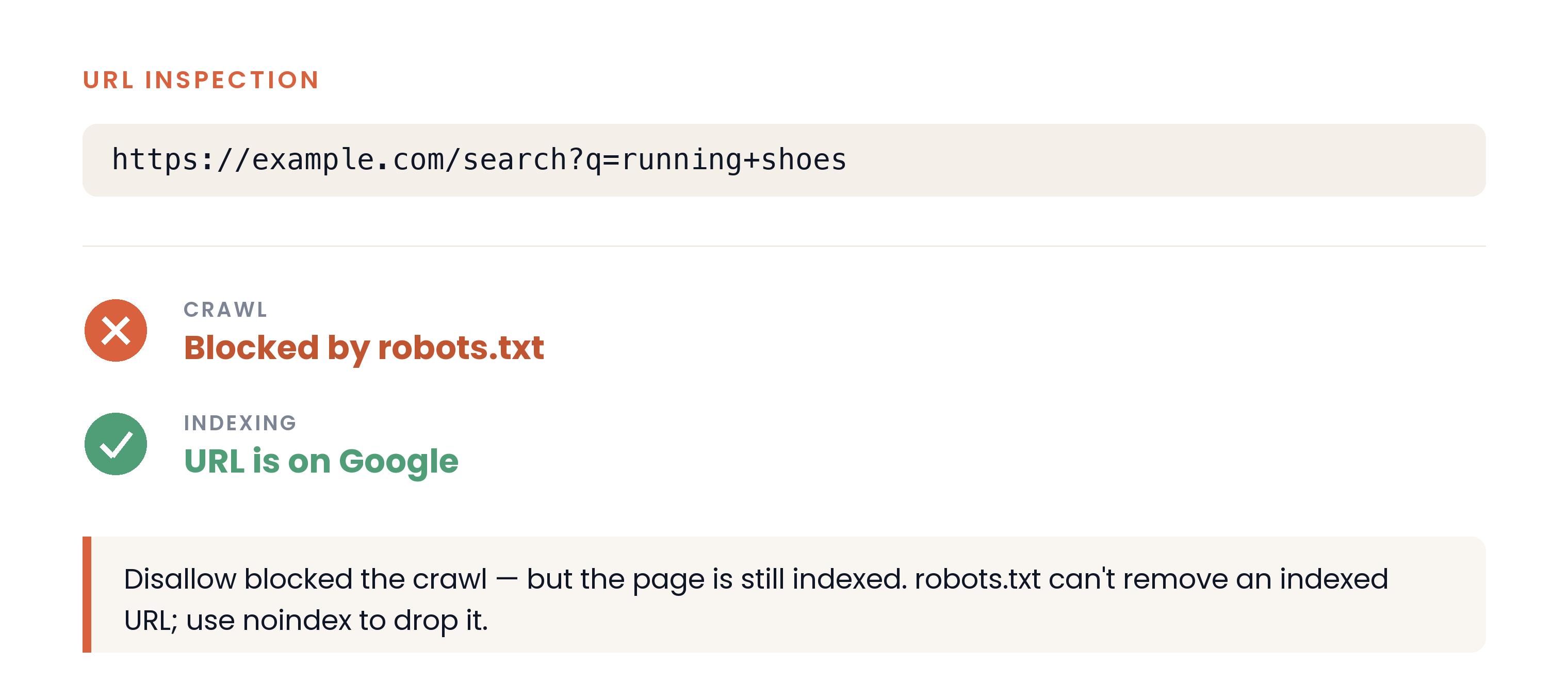
/assets/screenshots/robots-txt-for-developers/url-inspection-crawl-vs-index.png This is the mistake that costs the most. If you want a page out of Google’s index, robots.txt is the wrong tool, and using it actively prevents the right tool from working.
To drop a page from the index you serve a noindex rule, either as a meta tag or an HTTP header:
<!-- In the page <head> -->
<meta name="robots" content="noindex">
# As a response header: also works for non-HTML files like PDFs
X-Robots-Tag: noindexBut a crawler can only obey a noindex it is allowed to read. Google’s guidance is unambiguous: “For the noindex rule to be effective, the page or resource must not be blocked by a robots.txt file, and it has to be otherwise accessible to the crawler.” Block the URL in robots.txt and Googlebot never fetches the page, never sees the noindex, and leaves an indexed URL in the index.
So the correct removal recipe is the opposite of the instinct:
- Keep the URL crawlable. Do not disallow it in
robots.txt. - Add
noindexvia meta tag orX-Robots-Tagheader so the crawler sees it on the next fetch. - Wait for a recrawl, or request one, so Google drops the URL from the index.
- Only then, if you also want to save crawl budget, disallow the path. Do this only for URLs nothing links to: Google says a disallowed page “can still be indexed if linked to from other sites”, and once the block is back it can no longer see the
noindex.
The canonical vs noindex guide covers when noindex is the right signal at all. For genuinely sensitive content, neither directive is a security control: both are requests that compliant bots honour and hostile ones ignore. Anything that must not be public belongs behind authentication.
Controlling AI crawlers
The same file that steers Googlebot is now the main control surface for the AI crawlers behind ChatGPT, Claude, Perplexity and Gemini. Each vendor ships several tokens split by purpose, so this is a set of choices, not one switch. It is a direct lever on your generative engine optimization posture: you decide, per bot, whether your content feeds model training, appears in AI search answers, or both.
I checked every token below against the vendor’s own documentation in September 2026. These strings are exact, and a typo means the rule silently does nothing.
| Token | Vendor | Purpose | Obeys robots.txt? |
|---|---|---|---|
GPTBot | OpenAI | Crawls content that may train foundation models | Yes |
OAI-SearchBot | OpenAI | Surfaces sites in ChatGPT search | Yes |
ChatGPT-User | OpenAI | Fetches pages when a user asks | ”robots.txt rules may not apply” |
ClaudeBot | Anthropic | Collects content that may train Claude | Yes |
Claude-SearchBot | Anthropic | Improves Claude’s search results | Yes |
Claude-User | Anthropic | Fetches pages when a user asks | Yes, per Anthropic |
PerplexityBot | Perplexity | Surfaces and links sites in Perplexity; not training | Yes |
Perplexity-User | Perplexity | Fetches pages when a user asks | ”generally ignores robots.txt rules” |
Google-Extended | Gemini training and grounding; no Search impact | Control token only |
Sources: OpenAI’s crawler documentation, Anthropic’s crawler help article, Perplexity’s crawler documentation and Google’s list of common crawlers.
The purpose column is what makes a nuanced policy possible. OpenAI’s documentation says each setting “is independent of the others”: a webmaster “can allow OAI-SearchBot in order to appear in search results while disallowing GPTBot”. So the common intent, keep me out of training but visible in AI answers, is expressible in one file:
User-agent: *
Allow: /

# Opt out of AI training
User-agent: GPTBot
User-agent: ClaudeBot
User-agent: Google-Extended
Disallow: /

# Stay visible in AI search and answers
User-agent: OAI-SearchBot
User-agent: Claude-SearchBot
User-agent: PerplexityBot
Allow: /

Sitemap: https://example.com/sitemap.xml
Google’s parser returned DISALLOWED for GPTBot, ClaudeBot and Google-Extended, and ALLOWED for OAI-SearchBot, Claude-SearchBot, PerplexityBot, Googlebot and Bingbot.
The caveats that keep this honest:
- Google-Extended costs nothing in Search. Google states it “does not impact a site’s inclusion in Google Search nor is it used as a ranking signal in Google Search.” It has no HTTP user agent of its own; it is a token Google checks when deciding how crawled content may be used.
- User-initiated fetchers differ by vendor. OpenAI says
ChatGPT-Userrules “may not apply”, and Perplexity saysPerplexity-User“generally ignores robots.txt rules”. Anthropic, by contrast, says disablingClaude-User“prevents our system from retrieving your content in response to a user query.” - Changes are not instant. OpenAI says it “can take ~24 hours” for search results to reflect a
robots.txtupdate, and Perplexity’s page says “up to 24 hours”. Crawl-delayis vendor-specific. Anthropic supports the “non-standard Crawl-delay extension”; Google does not.- IP blocking is not a substitute. Anthropic warns that blocking its IP addresses “may not work correctly or persistently guarantee an opt-out, as doing so impedes our ability to read your robots.txt file.”
- Compliance is voluntary. These vendors document that they honour the file, but a
robots.txtrule is a policy signal, not enforcement.
To see which of these bots actually reach your pages, and to check that a request claiming to be one of them is genuine, use AI crawler log analysis.
Testing your robots.txt
A robots.txt rule is one character away from doing nothing, or from blocking a page you need. I test every change three ways.
1. Fetch the file as the bot in question. Request the raw file the way a specific crawler would:
curl -sA "GPTBot" https://example.com/robots.txtThat confirms the file is reachable, returns 200, and contains the group you expect. A 4xx (other than 429) means Google treats the site as unrestricted; a 5xx means Google stops crawling for the first 12 hours.
2. Test the rules in CI before they deploy. Keep a list of URLs that must stay crawlable and URLs that must stay blocked, and fail the build if the file disagrees. This uses the robots-parser npm package:
// robots.test.mjs  (run with: node robots.test.mjs)
import { readFileSync } from 'node:fs';
import assert from 'node:assert/strict';
import robotsParser from 'robots-parser';

const robots = robotsParser(
  'https://example.com/robots.txt',
  readFileSync('robots.txt', 'utf8'),
);

// [user agent, path, expected crawlable?]
const expectations = [
  ['Googlebot', '/pricing', true],
  ['Googlebot', '/search-engine-optimisation-guide', true],
  ['Googlebot', '/api/docs/auth', true],
  ['Googlebot', '/app/dashboard', false],
  ['Googlebot', '/search?q=sso', false],
  ['Googlebot', '/blog?sort=new', false],
];

for (const [ua, path, expected] of expectations) {
  const actual = robots.isAllowed(`https://example.com${path}`, ua);
  assert.equal(actual, expected, `${ua} ${path}: expected ${expected}, got ${actual}`);
  console.log(`ok  ${ua.padEnd(10)} ${path}`);
}
Against the SaaS file above, all six lines print ok. When I reverted the search rule to a bare Disallow: /search, the script exited with code 1 and this message:
AssertionError [ERR_ASSERTION]: Googlebot /search-engine-optimisation-guide: expected true, got falseOn every rule in the Disallow table and every example file on this page, robots-parser 3.0.1 gave the same answers as Google’s parser. The one case where it did not was the Sitemap-between-groups file, which is why that line goes at the end.
Do not use Python’s urllib.robotparser for this. On Python 3.11 it returned False for /reports/quarterly/q3.html with the precedence file from earlier, and True once I swapped the two lines. It applies the first matching rule rather than the most specific one, and it allowed /files/a.pdf under Disallow: /*.pdf$. For a definitive answer, build Google’s parser and run it locally, which takes a few minutes with CMake.
3. Confirm a URL’s real status in Search Console. The ground truth for Googlebot is URL Inspection. It reports whether a page is Blocked by robots.txt, and separately whether it is indexed. That closes the loop that trips people up, because a page can be disallowed and still indexed. Pair it with Search Console’s robots.txt report to see the exact file Google last fetched and any parse errors.
Fold these checks into a recurring pass rather than a one-off. A robots.txt regression from a deploy is exactly the kind of silent failure the 12-phase SEO & GEO audit is built to catch. To crawl the whole site the way a bot would, the technical SEO tools comparison covers the crawlers and log analysers worth using.
Where robots.txt fits
robots.txt is a small file with an outsized ability to help or harm, and using it well comes down to one boundary. It controls crawling, and crawling is upstream of, but separate from, indexing and AI exposure. Use it to steer crawl budget and to set your per-bot AI policy. Reach for noindex when you need a page gone from results, and remember that a page you want de-indexed must stay crawlable long enough for the crawler to read the noindex.
That boundary is the same discipline the rest of the SEO for engineers series runs on: treat each of these as an engineering control with a specific, testable behaviour, not a folk remedy you apply and hope. If you would rather have someone audit the crawl layer for you, that is part of technical SEO and GEO work.
Frequently asked questions
Does robots.txt prevent a page from being indexed?
No. robots.txt controls crawling, not indexing. Google states that it “is not a mechanism for keeping a web page out of Google,” and a disallowed URL can still be indexed if other sites link to it, appearing without a snippet. To keep a page out of the index, use a noindex meta tag or X-Robots-Tag header on a page that is not blocked in robots.txt.
What’s the difference between Disallow and noindex?
Disallow in robots.txt tells a crawler not to fetch a URL. noindex tells a search engine not to list a URL in results. They work at different stages and do not substitute for each other: Disallow can leave a page indexed but uncrawled, while noindex needs the page to be crawlable so the rule can be read.
Does every site need a robots.txt file?
No. Google’s documentation says that unless you specify otherwise, all files are implicitly allowed for crawling, and a 404 for robots.txt is treated as no restrictions. A file is still worth having for the Sitemap line and for a deliberate AI crawler policy. What you must avoid is a file that returns a 5xx: Google stops crawling the site for the first 12 hours, then falls back to the last copy it fetched successfully.
How do I block AI crawlers like GPTBot and ClaudeBot with robots.txt?
Add a group with User-agent: GPTBot, User-agent: ClaudeBot and User-agent: Google-Extended on separate lines, followed by Disallow: /. Those tokens cover training. To stay visible in AI answers, leave OAI-SearchBot, Claude-SearchBot and PerplexityBot allowed. User-initiated fetchers such as ChatGPT-User and Perplexity-User may not follow robots.txt at all.
Does blocking Google-Extended hurt my Google rankings?
No. Google documents that Google-Extended governs whether crawled content may be used to train Gemini models and for grounding, and that it “does not impact a site’s inclusion in Google Search nor is it used as a ranking signal in Google Search.” Blocking it has no effect on classic Search crawling, indexing or ranking.
Where does the Sitemap directive go in robots.txt?
At the end of the file, after the last User-agent group. Google applies Sitemap lines to all crawlers, but it skips them when grouping rules, so a Sitemap line placed between two groups can merge them. Use an absolute URL, and add one Sitemap line per sitemap or sitemap index if you have several.