 Nadia Mohamed
Technical SEO
Crawled – Currently Not Indexed: What Google's Status Really Means and How to Fix It
I do SEO as a developer, which means the Search Console statuses I care most about are the ones that sound like errors but aren’t. “Crawled – currently not indexed” is the worst offender. Nothing is broken. There’s no noindex, no robots.txt block, no 4xx. Googlebot came, read the whole page, and then decided not to put it in the index. That’s not a crawling bug you patch — it’s a verdict on the page, and the fix is almost never the one people reach for first.
“Crawled – currently not indexed” is a Google Search Console Page Indexing status meaning Googlebot successfully fetched and evaluated the URL but chose not to add it to the index — a signal that the page, as it stands, didn’t clear Google’s bar for value, uniqueness, or importance, rather than a technical error blocking access.
Key takeaways
- Crawled is not indexed. Google’s own definition is explicit: “The page was crawled by Google but not indexed. It may or may not be indexed in the future; no need to resubmit this URL for crawling.”
- It’s a quality decision, not a failure. Google states plainly that “indexing isn’t guaranteed; not every page that Google processes will be indexed.” The page reached the evaluation stage and lost.
- The usual causes are thin, duplicative, or orphaned content. In my audits this status clusters on low-value pages, near-duplicate templated URLs, and pages with almost no internal links pointing at them.
- Don’t spam Request Indexing. There’s a quota, and per Google, “requesting a recrawl multiple times for the same URL won’t get it crawled any faster.” You have to change the page, then validate.
- This is distinct from “Discovered – currently not indexed.” Discovered means Google hasn’t crawled the URL yet; Crawled means it has, and still passed.
What “Crawled – currently not indexed” actually means
Start with Google’s definition, because the wording is doing more work than most people notice. The Page Indexing report describes the status as: “The page was crawled by Google but not indexed. It may or may not be indexed in the future; no need to resubmit this URL for crawling.”
Three things are embedded in that one sentence. First, access is not the problem — Googlebot fetched the page successfully, so nothing at the crawl layer is blocking it. Second, the decision is provisional (“may or may not be indexed in the future”): Google is holding the URL in a kind of purgatory, not rejecting it outright. Third, and most importantly, “no need to resubmit” is Google telling you that hammering the Request Indexing button is not the lever. The lever is whatever made the page fall short of the index in the first place.
The mechanism sits at the end of Google’s pipeline. Crawling fetches the page; rendering executes it; indexing evaluates it and decides whether it earns a slot. Google is unambiguous that this last step is conditional — “indexing isn’t guaranteed; not every page that Google processes will be indexed.” A page can sail through crawling and rendering and still be set aside at indexing. That is precisely the state this status describes: fully processed, deliberately excluded.
It helps to contrast it with its lookalike. “Discovered – currently not indexed” means Google knows the URL exists but “was found by Google, but not crawled yet.” That’s a crawl-scheduling issue — often Google holding back to avoid overloading your server. The Crawled status is one step further down the pipeline and a fundamentally different problem: the crawl already happened. Fixing a Discovered page is about crawl capacity and internal links; fixing a Crawled page is about the page’s substance.
| Crawled – currently not indexed | Discovered – currently not indexed | |
|---|---|---|
| What happened | Google fetched and evaluated the page | Google knows the URL but hasn’t crawled it yet |
| Root cause | A value or quality verdict on the page | Crawl scheduling — often holding back to avoid overloading your server |
| The fix | Improve the page, cut duplication, add internal links | Crawl capacity and internal links |
Why Google crawls a page and then skips it
There’s rarely a single reason, but the causes I find fall into four buckets, roughly in order of how often they’re the culprit.
1. Thin or low-value content. This is the most common by a wide margin. Google lists “the quality of the content on the page is low” as a reason a processed page may not be indexed. If the page is a stub, a near-empty tag archive, boilerplate with the serial number filed off, or a thin affiliate/programmatic page that doesn’t say anything the web doesn’t already have ten times over, Google reads it and decides it isn’t worth a slot. The page technically works; it just doesn’t justify its own existence.
2. Duplication and near-duplicates. Google detects during indexing whether a page is a duplicate of another page and picks a single representative version for the index. On large templated sites this is brutal: faceted URLs, sort-order variants, thin location or category pages spun from one template, and paginated series all read as near-identical. Google’s crawl-budget guidance is blunt about the cost — “if many of these URLs are duplicates… this wastes a lot of Google crawling time on your site.” When forty pages say roughly the same thing, Google indexes one and parks the other thirty in this status.
3. Weak internal linking and orphaned pages. This one isn’t in Google’s status definition, but it’s the pattern I see most in real audits. A page buried ten clicks deep, reachable only from a sitemap, with no contextual links pointing to it, reads to Google as low-importance — nothing on your own site is voting for it. Internal links are how you tell Google a page matters relative to the rest of your library. A page nobody links to internally is a page you’ve implicitly labeled unimportant, and Google is happy to take you at your word.
4. Site-level quality and crawl signals. For large sites, this compounds. Google says “Googlebot’s demand varies based on a site’s size, update frequency, page quality, and relevance, compared to other sites,” and that “URLs that are more popular on the Internet tend to be crawled more often.” If a site is thin overall, Google gets more selective about what it commits to the index from that domain. One weak page in an otherwise strong library gets indexed on goodwill; the same page on a site full of weak pages doesn’t. For most sites under a few thousand pages, though, treat crawl budget as a red herring — the problem is almost always page-level value, not crawl capacity.
A diagnostic decision tree
When I hit this status on a URL that should be indexed, I run it through a fixed sequence before touching the content. It saves rewriting a page that had a mechanical problem all along.
"Crawled – currently not indexed" on a URL you WANT indexed
│
├─ Is it actually a page you want indexed?
│   └─ No  → Leave it. Or noindex / canonicalize it deliberately. Done.
│           (Tag pages, filters, thin variants belong here.)
│
├─ Run URL Inspection → "Test live URL". Does the rendered HTML
│  contain the real H1, body copy, and canonical?
│   └─ No  → Rendering/JS problem, not a quality verdict. Fix that first.
│
├─ Does the page's canonical point to ITSELF?
│   └─ No  → You (or the CMS) canonicalized it away. Expected exclusion.
│
├─ Is there a near-duplicate of this page elsewhere on the site?
│   └─ Yes → Consolidate, differentiate, or canonicalize to the winner.
│
├─ How many internal links point to this URL (contextual, not nav/sitemap)?
│   └─ 0–1 → Orphan problem. Add real in-content links from relevant pages.
│
└─ Still nothing wrong mechanically?
    └─ It's a value verdict. Rewrite the page to earn the slot, then validate.
The order matters. The first three checks catch pages that were never really eligible — deliberate exclusions and rendering failures masquerading as quality problems. Only once those are cleared am I willing to conclude that Google read a perfectly accessible page and judged it not worth indexing. That conclusion is the expensive one, because the fix is real work.
How to actually fix it
Once the decision tree points at a genuine value or duplication verdict, here’s what moves the needle — in the order I’d spend effort.
Consolidate before you create. If the page is a near-duplicate, the fastest win is often to merge it into the stronger version and redirect, or set a canonical to the page you actually want ranked. Ten thin pages competing for one intent become one page that clears the bar. This directly attacks the “wastes a lot of Google crawling time” problem Google describes for duplicate-heavy sites.
Make the page substantively better, not longer. Thin isn’t a word count — it’s a value problem. Add the thing the page was missing: original data, a worked example, a real answer to the query it targets, something the other results don’t already carry. Google’s bar is comparative (“compared to other sites”), so the question is never “is this page good?” but “is this page a better result than what’s already indexed for this intent?”
Fix the internal linking. Add contextual links to the page from relevant, already-indexed pages — real in-content anchors, not another sitemap entry or footer link. This is the single highest-leverage move for an orphaned page, and it’s free. It tells Google, in the currency Google actually reads, that the page matters.
Prune what shouldn’t exist. Some pages flagged with this status are correctly excluded. Thin tag archives, filtered variants, and auto-generated stubs don’t need to be in the index. noindex them (for PDFs and other files, with an X-Robots-Tag header) or canonicalize them on purpose, so the status becomes an intentional state rather than an open question. This is as much a fix as rewriting — it stops you chasing pages Google was right to skip. I cover the wider version of this triage in my technical SEO audit process.
Validating the fix with URL Inspection and Request Indexing
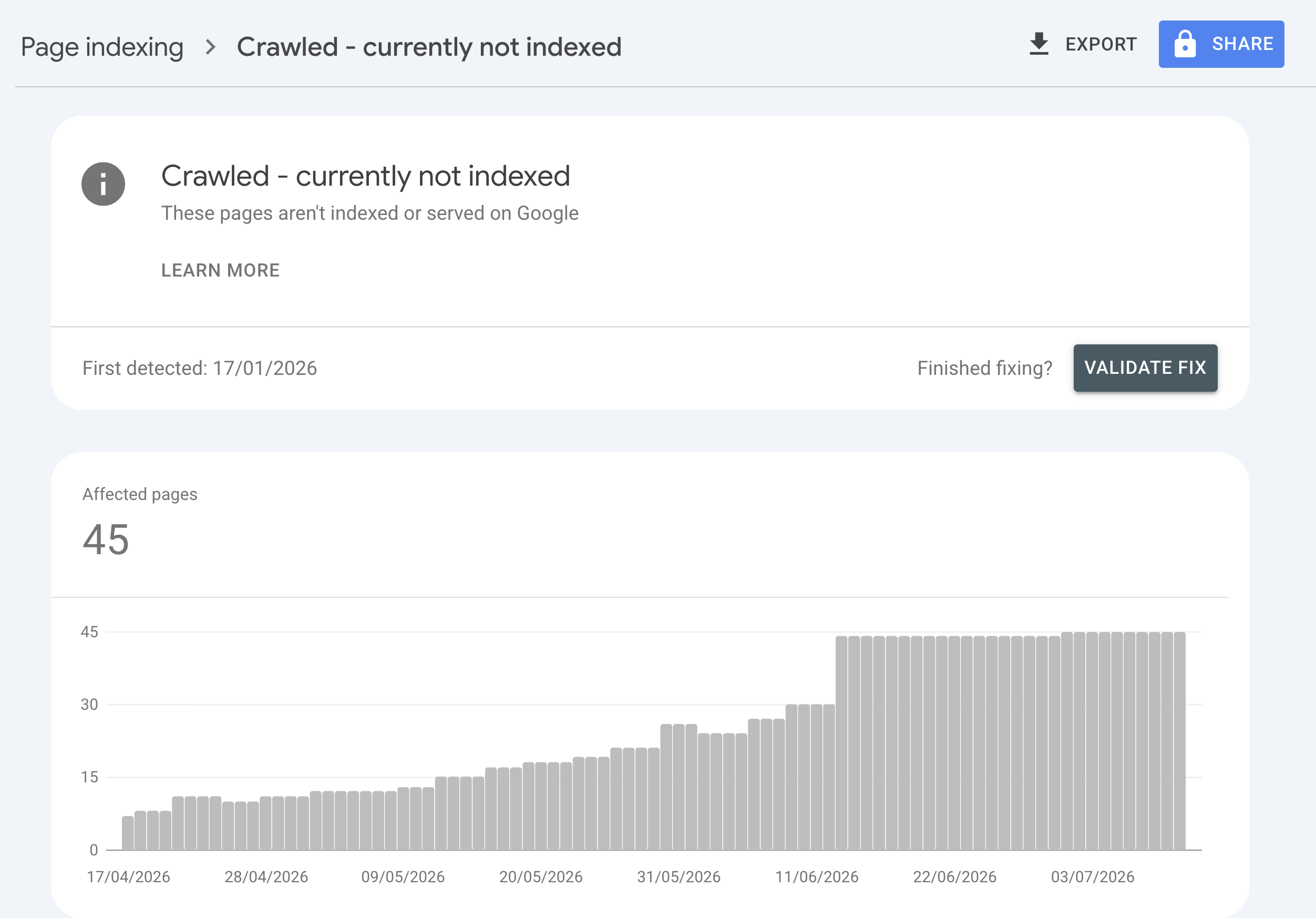
/assets/screenshots/crawled-currently-not-indexed/gsc-crawled-not-indexed.png You’ve changed the page. Now confirm the fix reached Google and ask for a re-evaluation — in that order.
- Inspect the live URL. In Search Console, run URL Inspection on the URL and choose Test Live URL, then View Tested Page. Read the rendered HTML and confirm your improved content, a self-referencing canonical, and the metadata are all present in what Googlebot actually receives. If your fix lives only in the browser DOM and not in the rendered HTML, it hasn’t really shipped.
- Request indexing — once. If the live test looks right, click Request Indexing. This queues the URL for a fresh crawl. Note Google’s own constraint: “there’s a quota for submitting individual URLs and requesting a recrawl multiple times for the same URL won’t get it crawled any faster.” One request per meaningful change. Resubmitting the same unchanged URL five times does nothing but burn quota.
- Confirm crawling in your logs. If you have server access, watch for Googlebot re-fetching the URL after your request — log-file analysis is the ground truth for whether the recrawl actually happened, separate from what the report shows. I walk through that in log-file analysis for SEO.
- Wait, then re-check the report. Indexing decisions aren’t instant. Give it days to a couple of weeks, then use the Validate Fix flow in the Page Indexing report so Google formally re-evaluates the affected URLs and tells you whether they moved into the index.
The temptation is to skip straight to Request Indexing without changing anything, because it feels like doing something. It isn’t. Google already told you resubmitting an unchanged URL won’t help. The request only matters once the page is different enough to plausibly earn a different verdict.
Where this fits in a technical audit
The Crawled status is one row in the Page Indexing report, but it’s a symptom that ties into the wider health of a site: content depth, internal link architecture, duplication control, and crawl efficiency. On a single page it’s a quick decision-tree pass. Across a few hundred URLs it’s a signal that your templating or content strategy is producing pages that don’t earn their place — and that’s an audit-level finding, not a one-URL fix. I fold the indexing report into the crawl-and-index stage of the 12-phase SEO and GEO audit, where it sits alongside the rendering, canonical, and internal-linking checks it depends on.
If you’d rather have the diagnosis and the fixes shipped than work through the tree yourself, that’s the kind of thing I do on a technical SEO audit — separating the pages Google was right to skip from the ones that are being wrongly held back, and fixing the second group.
FAQ
What does “Crawled – currently not indexed” mean in Google Search Console?
It means Googlebot successfully fetched and processed the page but chose not to add it to the index. Google’s definition is: “The page was crawled by Google but not indexed. It may or may not be indexed in the future; no need to resubmit this URL for crawling.” Access isn’t the problem — the page reached Google’s evaluation stage and didn’t clear the bar for being indexed, usually on quality, uniqueness, or importance grounds.
Is “Crawled – currently not indexed” an error I need to fix?
Not always. If the flagged URL is a thin tag archive, a filtered variant, or a near-duplicate you never wanted indexed, the status is correct and you can leave it or noindex it deliberately. It’s only a problem when it lands on a page you genuinely want in search — and then the fix is to improve the page’s value, cut duplication, or add internal links, not to resubmit it.
How is “Crawled” different from “Discovered – currently not indexed”?
“Discovered – currently not indexed” means Google knows the URL exists but hasn’t crawled it yet, often because it rescheduled the crawl to avoid overloading your site. Crawled is one step later: the crawl already happened and Google still declined to index the page. Discovered is a crawl-capacity and internal-linking issue; Crawled is a page-value issue.
Will requesting indexing fix “Crawled – currently not indexed”?
Not on its own. Google states there’s a quota for URL submissions and that “requesting a recrawl multiple times for the same URL won’t get it crawled any faster.” Resubmitting an unchanged page does nothing. Request Indexing only helps after you’ve meaningfully improved the page, so Google has a reason to reach a different decision when it recrawls.
How long does it take for a page to move out of “Crawled – currently not indexed”?
There’s no fixed timeline — Google says a page in this state “may or may not be indexed in the future.” After you improve the page and request indexing, expect anywhere from a few days to a couple of weeks before the Page Indexing report reflects a change. Use the report’s Validate Fix flow to have Google formally re-evaluate the affected URLs.
Can thin content cause “Crawled – currently not indexed”?
Yes — it’s the most common cause I see. Google lists low content quality as a reason a processed page may not be indexed, and its bar is comparative: the page has to be a better result than what’s already indexed for the same intent. A stub, a boilerplate page, or a thin programmatic page reads as not worth a slot, so Google crawls it and moves on without indexing it.