 Nadia Mohamed
Measurement
How to Track AI Overviews in 2026: The Four-Layer Measurement Stack
Almost every guide on tracking AI Overviews opens with the same claim: Google tells you nothing, so buy a tool. That claim expired in June 2026, when Google shipped a dedicated generative AI performance report inside Search Console.
It does not solve the problem. It reports impressions and withholds clicks, which means the hardest question — what has this cost me? — still has to be inferred. But it changes where you start, and it changes what you should be paying for.
For what that inference is actually worth, the six-site study behind this guide prices one impression against 24.5 million of them: a blended 0.86% click-through rate, and 37 queries at a top-ten average position that returned no clicks at all.
This is the measurement stack rebuilt around what Google now actually reports: four layers, each answering a different question, each with a stated accuracy limit. No layer is sufficient alone. Knowing which layer answers which question is the whole skill.
Key takeaways
- Google’s Search Console generative AI performance report covers AI Overviews and AI Mode, but reports impressions only — no click data at all.
- Ranking first does not mean being cited — each overview draws on several sources, so rank and citation are separate signals that need separate tracking.
- Citations are volatile: nearly half of the sources cited in an AI Overview are entirely new between consecutive responses, at 45.5% per the same Ahrefs dataset.
- Click impact cannot be measured, only estimated — a regex proxy in Search Console gets close enough to report, provided you label it as an estimate.
- Bing gives you citation-level data that Google withholds, per Microsoft’s Bing Webmaster Tools announcement — which URLs were referenced, not merely how often you appeared.
What “tracking AI Overviews” actually means
“Tracking AI Overviews” collapses four separate measurements into one phrase, and most of the confusion in this topic comes from not naming them apart.
Presence. Does an AI Overview appear for this query at all? This is a property of the SERP, not of your site.
Your citation. When one appears, is your URL among the sources? This is the measurement people assume rank tracking already covers. It does not.
Competitor citation. Who is cited when you are not? This is where content gaps become visible.
Click impact. What has the overview cost you in clicks on queries where you rank well? This is the number leadership asks for, and the only one no tool can measure directly.
The gap between the first two is the point. Keyword.com’s analysis of 5.46 million AI Overviews found that even the #1 organic result was cited inside the overview only about 40% of the time, because each overview typically draws from roughly 5.5 sources rather than the top of the page. Rank and citation are correlated but distinct.
Rank still matters, though — heavily. In that same dataset, citation rate fell from 36.8% for pages ranked 1–3 to 21.5% for 4–10, 9.4% for 11–20, and 1.7% for 51–100. Top-three pages were cited roughly 22 times more often than pages in the fifties. So rank is a strong prior on citation, and a poor substitute for measuring it.
The four-layer stack at a glance
| Layer | Answers | Cannot tell you | Setup cost |
|---|---|---|---|
| 1. GSC generative AI report | How often your links appeared in AI Overviews and AI Mode, by page, country, device and date | Clicks, CTR, which query, whether you were cited or merely surfaced | Minutes — if your property has it |
| 2. GSC regex proxy | Estimated click impact on AI-Overview-shaped queries | Confirmation that an overview actually fired for a given query | An hour, repeatable monthly |
| 3. GA4 + GTM text fragments | Session-level evidence that specific pages received AI Overview clicks | Complete coverage — and it bundles Featured Snippet and PAA clicks in | Half a day of GTM work |
| 4. Third-party citation tracking | Which URLs are cited, and who is cited instead of you | Anything about clicks or revenue | Ongoing subscription |
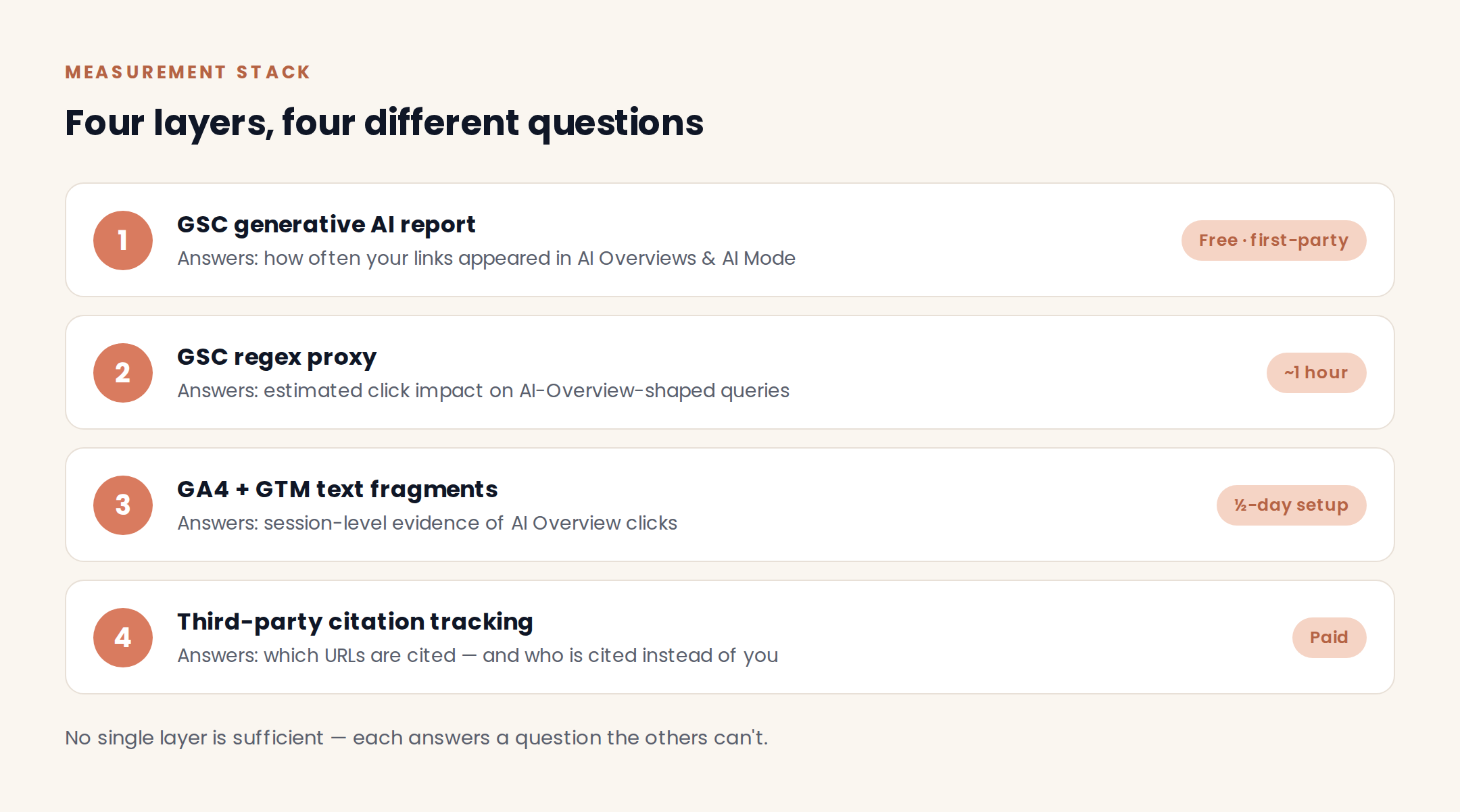
/assets/diagrams/four-layer-measurement-stack.png Two rules hold across all four. First, trends beat snapshots: AI Overviews have a 70% chance of changing from one observation to the next, per Ahrefs’ study of 43,000 keywords. Second, no layer is a substitute for another — anyone selling you one as the complete picture is selling you a subscription, not a measurement.
Layer 1: The Search Console generative AI report
Start here, because it is free, first-party, and most published guides predate it.
What the report gives you
The report covers both AI Overviews and AI Mode. According to Google’s Search Console documentation, impressions are counted as how many times links to your site were shown to a user in a generative AI feature on Google Search. Two results from the same site inside one feature count as a single impression at property level.
You get the report’s four grouping options — Pages, Countries, Devices, and Dates. That is genuinely useful. Grouping by page tells you which URLs Google is willing to surface in generative features, which is the closest free signal you have to a citation list.
What it deliberately withholds
Clicks. There is no click column, no CTR, and no queries dimension in those four groupings. You can see that a page appeared; you cannot see whether anyone came, or what they searched.
That is not an oversight to work around later — it is the shape of the data, and it dictates the rest of the stack. It also means the report cannot be read like a standard performance report. An impressions line that rises while organic clicks stay flat is the expected pattern here, not an anomaly, and it is the same dynamic behind zero-click searches generally.
Note also that the standard Performance report has not changed. Google Search Central states that AI Overviews and AI Mode are reported within the “Web” search type — so AI-driven clicks have always been mixed into your organic numbers, and still are.
If you don’t have the report yet
Rollout is partial. Search Engine Land’s rollout tracking records the report as initially released in early June 2026 and expanded to more properties within roughly 20 days, with Google releasing it incrementally rather than to everyone at once.
Check monthly. If it is not in your property, skip to Layer 2 — which you need regardless, because Layer 1 has no click data.
Layer 2: The regex proxy for click impact
Because no Google surface reports AI Overview clicks, click impact has to be inferred from query shape. The method is crude and defensible, in that order. For a statistical estimate of the click impact, with position-matched control queries and a confidence interval, see quantifying AI Overview CTR impact.
The query filter
Build a query filter in Search Console that isolates the queries an AI Overview is likely to have fired on. Three conditions, applied together:
- Include informational queries. A “matches regex” filter on question starters and explainer modifiers:
^what |^how |^why |^when |^where |^who |^which | guide|tutorial|definition|examples?|vs\.?|versus| best way|difference between|meaning of. This is the highest-yield condition, because Ahrefs’ analysis of 150,000 AI Overview keywords found 99.2% of AI Overview keywords are informational in intent. - Include long conversational queries. A second pass with
^(?:\S+\s+){9,}\S+$catches queries of ten words or more, which read like prompts rather than keywords. - Exclude branded and commercial terms. Two “doesn’t match regex” filters — one on your brand and product names, one on commercial modifiers such as
price|pricing|cost|cheap|buy|discount|coupon|review.
Then set a date comparison across a rollout or a period you care about, export both ranges, and compare CTR at the query level.
How much accuracy do you give up by guessing? Less than you would expect. In Ahrefs’ own before-and-after test, regex-guessed AI Overview keywords showed a CTR drop of 3.76 percentage points, a 42% relative decline, against 3.98 points and 44% for confirmed AI Overview keywords — a relative difference of about 2%. The proxy is close enough to report, provided you label it a proxy.
For scale context, Ahrefs’ 300,000-keyword CTR study found the presence of an AI Overview correlated with a 34.5% lower average clickthrough rate for the top-ranking page, comparing March 2024 with March 2025. That is a correlation across a large sample, not a measured loss on your site — useful as a benchmark, not as a forecast.
Reading stable rank with falling CTR
The pattern worth building a standing alert on is a query where average position holds, impressions hold or rise, and CTR falls. That combination points at the SERP rather than at your page.
It matters because it changes the response. A ranking loss calls for content and link work; an on-SERP answer absorbing the click does not. Diagnose it wrong and you spend a quarter rewriting pages that were never broken.
Layer 3: GA4 and GTM text fragments — the only click-level signal
This is the one method that identifies individual sessions as AI Overview arrivals. It is also the fiddliest, and the one where implementation quality decides whether the data is worth anything.
When Google deep-links from an AI Overview to a cited passage, it often appends a text fragment to the URL: #:~:text=. That fragment is your signal.
You cannot catch it with a URL filter. As Ahrefs’ walkthrough of the fragment method sets out, GA4 cannot see #:~:text= strings because they are resolved client-side, so isolating those sessions requires Google Tag Manager: a custom JavaScript variable that reads the fragment from document.location.hash, passed into GA4 as an event parameter, then registered as a custom dimension so it becomes reportable.
Four steps, in order:
- Custom JavaScript variable in GTM that returns the decoded fragment text, or
undefinedwhen absent. - Trigger on page view where that variable is defined.
- GA4 event — name it something unambiguous like
serp_fragment_arrival— passing the fragment text and page path as event parameters. - Register the parameters as custom dimensions in GA4 Admin. Skip this and the data is collected but not queryable, which is the most common way this implementation quietly fails.
Then two limits you have to state whenever you report the number.
Coverage is partial: not every AI Overview link carries a fragment, so this is a sample, not a census. And the fragment is not exclusive to AI Overviews — Ahrefs’ caveat on the method notes that text-fragment URLs also appear when users navigate from Featured Snippets and People Also Ask boxes, so those clicks land in the same bucket.
The honest framing for a client report is “sessions arriving from an on-SERP answer feature”, not “AI Overview clicks”. It is the same discipline that makes full-funnel tracking trustworthy: name what the number measures, not what you wish it measured.
Layer 4: Citation tracking, and when you actually need it
Two questions remain that no Google surface answers: which of your URLs is cited inside the overview text, and who is cited when you are not.
Manual checking works as a diagnostic. Incognito window, logged out, fixed country and language parameters, same time of day, and a logged row per check: query, date, overview present, your URL cited, competitor URLs cited. Twenty keywords is a reasonable start.
It does not work as a monitoring system, for two reasons that compound.
The surface is volatile. In the Ahrefs volatility study above, only 54.5% of cited URLs overlapped on average between consecutive responses. A citation you record on Monday tells you little about Tuesday. This is also why citations you have already won need re-checking rather than filing; AI citation decay is a live risk, not a one-off audit finding.
And the cost scales badly. Keyword.com’s cost estimate puts a proper manual check at two to three minutes per keyword, which makes 100 keywords a 15-hour weekly commitment. At that point a subscription is cheaper than the analyst.
So the decision rule comes down to scale. Track manually while you are validating a hypothesis on a small keyword set. Pay for automation once you need trend data across more than about 25 keywords, or once competitor citation share becomes a reporting line rather than a curiosity. For a shortlist of what is available, see the best AI visibility tools — the tool choice matters far less than whether you are tracking the same keyword set consistently.
One free source deserves more attention than it gets. Microsoft’s Bing Webmaster Tools announcement introduced AI Performance in February 2026 as a public preview, showing when your site is cited in AI-generated answers across Microsoft Copilot, Bing’s AI summaries and select partner integrations — including which URLs are referenced and how citation activity changes over time. That is citation-level data Google does not give you, for free, on a different but overlapping surface.
Once tracking tells you a page is present but never cited, the work moves from measurement to optimisation — clearer answers near the top of the page, structured formatting, and the schema and entity signals covered in structured data for AI search and how to rank in Google AI Overviews.
Wiring the four layers into one report
Four layers in four interfaces is not a measurement system; it is four tabs nobody opens. The layers have to land in one view before anyone acts on them.
The pipeline I build for clients pulls the Search Console API for both the generative AI impressions series and the regex-filtered query set, GA4 for fragment-tagged sessions by landing page, and a CSV export from whichever citation tracker is in use — joined on URL, into a single reporting layer. If you want the build detail, the Looker Studio SEO dashboard walkthrough covers the same plumbing.
Watch the row limits when you automate: the generative AI report inherits the same 1,000-row limit as the standard report, and dates are grouped in Pacific Time, which will shift your daily buckets if you report in European time.
Four numbers are worth putting in front of leadership. Generative AI impressions, trended. Citation share on your tracked keyword set. The count of queries showing stable rank with falling CTR. Fragment-tagged sessions by landing page. Weekly scan, monthly baseline, quarterly review — and annotate the dates you changed anything, because without annotations you will be guessing at causation within two months.
What you can honestly claim from this data
This is the part that decides whether your reporting survives scrutiny, so be explicit about which numbers are measured and which are inferred.
Measured. Generative AI impressions, from Google’s own data. Fragment-tagged sessions, for the subset of clicks that carry a fragment.
Inferred. All click loss. Every click-impact number in this stack is an estimate derived from query shape and CTR movement. Report it as an estimate with the method named.
Sampled. Citation share, on a volatile surface, from whatever cadence your tracker runs at.
Two overclaims to avoid. Do not treat a single check as a trend — give it at least four weeks before you call a direction, and note that Google’s stated limitations include excluding Search Labs experiments and marking the newest days as preliminary, with values that can still change within hours. And do not convert inferred click loss into a revenue figure without labelling every assumption in the chain; the moment that number gets quoted back to you without its caveats, you own it.
AI Overviews are not AI referrals — measure them separately
These are two different measurements, and conflating them is the most common error in this area.
AI Overview visibility happens inside Google. It mostly produces no click, it is measured with the four layers above, and success looks like citation share.
AI assistant referrals arrive from another domain — ChatGPT, Perplexity, Claude, Copilot — land in GA4 as referral traffic, and are measured with a custom channel group. Success there looks like sessions and conversion rate.
Different surfaces, different tooling, different success metrics. If you need the referral half, how to track AI referral traffic in GA4 covers that setup end to end.
FAQ
Can you track AI Overviews in Google Search Console?
Partly, and more than you could before June 2026. Search Console now has a generative AI performance report covering AI Overviews and AI Mode, grouped by pages, countries, devices and dates. It reports impressions only — there is no click, CTR or query data — and it is still rolling out to properties incrementally, so check whether yours has it yet.
Do I need a paid AI Overviews tracker?
Only for citation-level data at scale. Google reports whether your pages appeared, but not which URLs the overview cited or who was cited instead of you. Manual checking covers that for around 20 keywords; past roughly 25, and certainly once competitor citation share becomes a reporting line, automation is cheaper than analyst time.
How often do AI Overviews change?
Frequently enough that snapshots are misleading. Both the overview text and the sources it cites change often between observations, as the volatility figures above show — roughly half the cited URLs turn over from one response to the next. Track the same keyword set on a fixed cadence and read trends over at least four weeks.
Can I see AI Overview clicks in GA4?
Not natively, and not with a URL filter. AI Overview clicks arrive as ordinary Google organic traffic. The workaround is to detect the #:~:text= fragment with a Google Tag Manager custom JavaScript variable and pass it to GA4 as an event parameter registered as a custom dimension — accepting that coverage is partial and that Featured Snippet and People Also Ask clicks get counted alongside.
How many keywords should I track to start?
Start with 20 to 25 informational, non-branded queries tied to pages that matter commercially. That is small enough to check manually while you learn what the data looks like, and large enough to show a pattern. Expand once you know which signals you actually act on.